Best ai tools for generative creativity in media platforms in 2026 is a long phrase for a simple reality: social media is bigger, faster, and more crowded than your attention span. DataReportal reports 5.66 billion social media “user identities” as of October 2025, which is why brands and creators are leaning into systems that let them ship more content without losing their minds. In 2026, AI content creation is less about “one magic prompt” and more about building a repeatable pipeline: ideas, scripts, visuals, edits, variants, and feedback loops.
What is AI content creation for social media
Social media content used to be a craft. Now it is a craft plus a production line. AI content creation means using AI to generate, edit, and optimise content assets for platforms like Instagram, TikTok, YouTube Shorts, LinkedIn, and X.
In practice, AI for content creation covers three layers:
- Ideas and structure: topics, hooks, outlines, content pillars, posting plans.
- Assets: images, carousels, thumbnails, B-roll, short video cuts, captions.
- Optimisation: A/B variants, platform-specific formatting, performance insights.
If you want a clean definition: AI social media work is when AI helps you make content faster and test more variants without sacrificing brand consistency.
Generative AI vs classic tools
Classic tools are mostly manual. They help you design, edit, schedule, and analyse. Generative AI helps you create new assets or transform existing assets.
- Classic workflow: design a post, write a caption, export, resize, repeat.
- Generative workflow: generate a first draft, iterate variations, then refine and export.
The important difference is speed-to-iteration. When generating variants is cheap, you can test hooks, formats, and creative angles more often.
Why AI is becoming standard in 2026
Three forces made AI “standard” rather than “optional”:
- The volume expectation: teams are asked to ship across more platforms, more formats, and more audience segments.
- The competition baseline: creators who use AI can test faster and learn faster.
- The format shift: short-form video and carousel storytelling reward frequent posting and consistent experimentation.
If you are searching for content creation tools for social media, you are usually trying to solve one of these problems: producing more content, producing better visuals, or producing faster variants.

How AI changed social media content creation
Social content did not “evolve”. It mutated. The workflow moved from manual creation to automation, and then to AI-assisted production.
From manual posts to AI automation
The old model was: brainstorm, design, write, edit, publish, repeat. That model breaks once you need daily output. The newer model is: create a system.
- A content calendar built around pillars.
- A prompt library that keeps voice consistent.
- A visual style guide that prevents random aesthetics.
- Templates that turn one message into five formats.
That is why best generative ai features for digital content creation 2026 are often the “boring” ones: templates, resizing, brand kits, and automated editing.
Faster workflows, more experiments
AI compresses the slowest part of content production: getting to a first draft. Once you have a draft, you can iterate.
- You test more hooks.
- You create more platform cuts.
- You reuse the same content idea in multiple formats.
It is not that AI makes content “better” by default. It makes learning faster by making variation cheaper.
More engagement through optimisation
AI is useful for engagement when it helps you match platform-native patterns:
- stronger first two seconds in video
- clearer on-screen captions
- more consistent pacing and cuts
- better headline and caption structure
- easier production of carousels with a narrative arc
The goal is not to trick the algorithm. The goal is to make content that is easier for humans to consume.

Best AI tools for social media content creation in 2026
Before you chase a list, it helps to define what “best” actually means. The phrase best ai tools for generative creativity in media platforms 2026 usually implies a mix of three traits:
- Quality: outputs look and sound good enough to publish.
- Control: you can keep the same style, voice, and identity across posts.
- Speed: you can generate and iterate without turning it into a full-time project.
And here is a small but useful distinction:
- “Generative creativity” is exploration: style directions, concepts, fresh visual ideas.
- Production creativity is output: the finished assets that go live, resized and on-brand.
The best stacks cover both.
Top AI content creation tools for social media
Below are 10 practical tools that cover the most common social media workflows. Each tool has strengths and limitations, because reality exists.
1. Phygital+
Phygital+ is a platform built around workflow automation for content. Instead of treating every post as a one-off, it helps you build pipelines that produce consistent assets across formats.
Best for:
- Best AI for social media content creation workflows that require repeatable visuals
- Producing variations for ads, posts, carousels, covers
- Keeping brand visuals consistent across campaigns
What it can do for social:
- Generate images, headers, and post-ready visuals in one workspace
- Run quick edits: background changes, upscaling, clean-ups
- Produce multiple size variants for different placements
Useful tools:
- Free AI Instagram post generator
- Free AI Image Generator
- Free AI background changer
- Free AI advertising generator
- AI infographic generator online
- AI image upscaler
Pros: workflow and pipeline mindset (repeatable output); multi-format social assets without constant app switching; designed for teams and creators who ship a lot.
Limitations: you get the best results when you define standards (brand colours, typography, formats).
2. Canva Magic Studio
Canva Magic Studio is one of the best in-app generative ai tools for digital media because it is built for the messy reality of marketing: templates, resizing, and quick output.
Best for: template-based asset production for social; turning one idea into multiple formats; teams with mixed design skill levels.
Pros: fast first drafts with templates and layouts; easy multi-format exports.
Limitations: high-end brand precision still benefits from a designer and a style system.
3. Adobe Firefly
Adobe Firefly is a strong option for image generation and controlled edits inside professional creative workflows.
Best for: AI image generation for social campaigns; controlled edits (remove objects, extend backgrounds, create variations); teams that already use Adobe tools.
Pros: strong editing workflows for marketing assets; practical for producing multiple creative variants.
Limitations: if your team is not in Adobe, it may feel like a detour.
4. Lumen5
Lumen5 is a text-to-video tool that turns scripts, blog posts, or notes into short videos.
Best for: AI video content creation tools for social media; quick social video updates without heavy editing.
Pros: fast conversion from text to video structure; useful for repurposing long content into short social formats.
Limitations: outputs often need brand refinement (fonts, colours, pacing).
5. Midjourney
Midjourney remains a powerhouse for visual directions and stylised imagery.
Best for: concept art for campaigns; strong aesthetics for best generative AI features for digital content creation 2026 (style exploration).
Pros: high-quality visual exploration and moodboards.
Limitations: not a layout tool, not a social publishing tool; brand consistency requires discipline and references.
6. ChatGPT + Vision
For captions, scripts, threads, hooks, and content plans, ChatGPT remains a practical centrepiece.
Best for: captions and headline options; content pillar planning; turning a video transcript into multiple posts.
Pros: fast ideation and writing support; useful for adapting one idea across platforms.
Limitations: needs human review for accuracy, tone, and brand voice.
7. Runway
Runway is a practical choice for AI video generation and motion workflows.
Best for: short-form video creation and motion assets; automating edits and generating variants.
Pros: strong motion workflow for campaign content; useful when you need more video output than your team can edit manually.
Limitations: results vary; best outputs come from iteration and direction.
8. TikTok AI creative tools
TikTok’s in-app and advertising tools are designed to make TikTok-native content easier to produce.
Best for: best in-app generative ai tools for digital media inside TikTok; scripts and creative suggestions optimised for TikTok formats.
Pros: TikTok-optimised scripts and content guidance; built-in platform fit.
Limitations: outputs are most useful if your content already matches TikTok culture and pacing.
9. CapCut AI tools
CapCut is a common editing layer for short video, especially for TikTok and Reels-style content.
Best for: auto captions and subtitle workflows; quick edits, pacing, and format conversions.
Pros: fast captioning and editing workflows; practical for creators who need speed.
Limitations: brand consistency still needs templates and style rules.
10. Jasper AI
Jasper is designed for marketing-focused writing with brand voice controls.
Best for: structured content ideation and campaign copy; consistent tone for teams; best generative ai features for digital content creation 2026 (brand voice systems).
Pros: brand voice and structured templates; useful for teams producing high volumes of copy.
Limitations: still needs human editing for nuance and accuracy.
Comparison table: AI tools for social media content creation
Below is a structured comparison table. Use it to build a stack that matches your workflow instead of collecting tools like trophies.
| Platform / Tool | Best use case | Content type | Social automation | Team collaboration | Scalability | Pricing |
|---|---|---|---|---|---|---|
| Phygital+ | Pipelines for consistent assets + edits | Text / Image + workflows | Medium–High | High | High | Free–Paid |
| Canva Magic Studio | Templates + fast multi-format output | Text / Image | High | High | High | Free–Paid |
| Adobe Firefly | Controlled edits + pro asset creation | Image | Medium | Medium–High | High | Paid |
| Lumen5 | Text → video conversion | Video | Medium | Medium | Medium–High | Paid |
| Midjourney | Visual directions + concept sets | Image | Low | Low–Medium | High | Paid |
| ChatGPT + Vision | Captions, scripts, ideation | Text | Medium | Medium | High | Free–Paid |
| Runway | Motion generation + video variants | Video | Medium–High | Medium | High | Paid |
| TikTok AI creative tools | TikTok-native scripts + in-app creation | Text / Video | High (in-app) | Medium | High | Free–Paid |
| CapCut AI tools | Editing + captions for short video | Video | Medium–High | Medium | High | Free–Paid |
| Jasper AI | Marketing copy + brand voice systems | Text | Medium | High | High | Paid |
Best generative AI features for digital content creation
Tools matter, but features are what you actually use. If you are searching for the best generative AI features for digital content creation in 2026, these are the functions that consistently show up in real workflows.
AI suggested headlines and captions
This is the fastest win. You can generate multiple hooks, CTAs, and caption angles, then test the best ones.
- Generate 10 hooks, pick 2, test in Reels
- Rewrite captions for different tones (bold, friendly, premium)
Automated video templates
Templates make video production repeatable. AI helps you fill those templates faster: script → edit → captions → platform cut.
Practical use: turn one idea into a 15-second, 30-second, and 60-second cut.
AI colour and brand consistency tools
Brand consistency is what keeps your account looking like one identity rather than random output.
- Enforce palette and typography
- Build reusable layouts for carousels and covers
Image upscaling and auto-edit
Upscaling, background changes, and quick clean-ups are the “quiet” features that save hours.
- Upscale a product shot for a carousel
- Remove clutter in the background
Social post optimisation
Optimisation features include suggested posting formats, caption structure improvements, readability checks for on-screen text, and platform-specific formatting rules. The best approach is simple: treat optimisation as “make it easier for humans”, not as “hack the algorithm”.

How to build an AI content creation workflow for social media
The difference between “using AI” and “getting results” is workflow. Below is a practical pipeline you can use whether you are a solo creator or a marketing team.
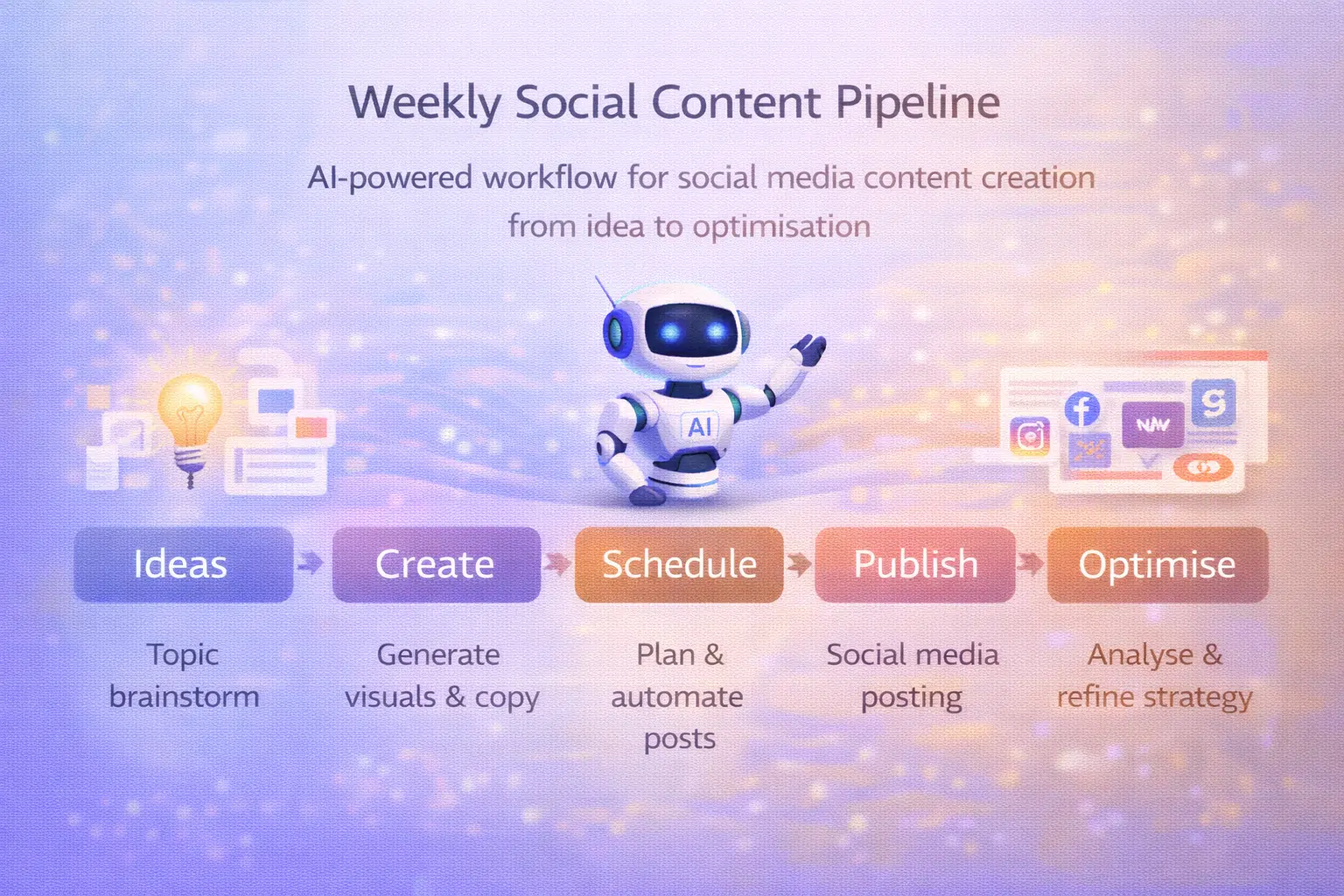
1) Idea → prompt generation
Start with content pillars, not random inspiration.
- Pick 3 pillars (education, proof, personality)
- Generate 10 ideas per pillar
- Turn ideas into prompts (hook + structure + CTA)
2) AI text and visuals generation
Generate assets in batches.
- Write 3–5 caption variants per post
- Generate visuals that fit your brand style
- Keep a prompt library for consistency
3) Automation and publishing-ready assets
Even if you schedule elsewhere, your workflow should output platform-ready files.
- Export in the correct ratios (feed, story, reel cover)
- Package captions and hashtags in a reusable format
4) Analytics and optimisation
Pick a small set of metrics that match your goal:
- Saves and shares (value content)
- Watch time (video)
- Clicks (traffic)
- Replies (community)
Then use AI to summarise what worked and propose the next tests.
5) Iteration
Iteration is where results come from.
- Double down on the winning hook
- Rebuild the same idea in a new format
- Improve the first two seconds of video
If you want AI tools for marketers to matter, your workflow needs that loop: create → publish → learn → improve.

How Phygital+ helps automate social media content creation
Phygital+ is most useful when your bottleneck is producing consistent assets across formats and campaigns. It is designed as a workspace where you can generate, edit, and standardise output without losing versions across apps.
How it supports AI social media workflows:
- AI content creation suite: generate post visuals, covers, ad creatives, and supporting graphics
- Visual consistency engine: keep style stable across posts and campaigns
- Multi-format production: create feed, story, reel cover, and carousel assets without redoing work
- Automation workflows: build repeatable pipelines for your weekly content schedule
- Team collaboration features: share assets and workflows so output stays consistent
Practical example workflow:
- Draft the post concept and caption variants.
- Generate a visual set (cover + slides + story version).
- Apply background changes or upscaling where needed.
- Export assets for each platform placement.
- Save the workflow and reuse it next week.
If your goal is reliable output, Phygital+ fits as the “production layer” in a stack of content creation tools for social media.
A single post is luck. A system is a strategy. In 2026, the teams and creators who win are the ones who treat AI content creation like a pipeline: consistent inputs, consistent output quality, and a weekly loop of learning. The tools above are not the goal. The calm, repeatable workflow is.
FAQ
What are the best AI tools for social media content creation?
The best stack depends on your workflow. For templates and fast multi-format output, Canva Magic Studio is strong. For captions and scripts, ChatGPT and Jasper help. For video editing and motion, CapCut and Runway are practical. For a workflow that produces consistent assets across formats, Phygital+ is built around pipelines.
Can AI fully automate content creation?
AI can automate drafts and variations, but it cannot replace judgement. You still need a human to verify facts, ensure brand fit, and make sure content is ethical and compliant.
Which AI tools work best for video content?
For quick text-to-video, Lumen5 is useful. For AI video generation and motion, Runway is a strong option. For short-form editing, CapCut is a practical choice for captions and pacing.
How do AI tools improve content quality?
They improve quality by making iteration cheaper: more hooks, more variants, faster edits, and clearer structure. Quality improves when you measure results and use the data to refine.
Are there free AI tools for social media content?
Yes. Many platforms have free tiers or free tools. Phygital+ offers a range of free AI tools for creators and teams. The trade-off is usually limited credits, exports, or advanced features.