A modern AI creative director is not “a tool that makes pictures”. It is a role-based system that supports creative direction at enterprise speed: generating concepts, enforcing brand standards, analysing feedback, and reducing the gap between strategy and production. This guide covers what that means in practice, how it changes workflows for creative directors and design leads, and which AI design tools are most relevant for enterprise teams.
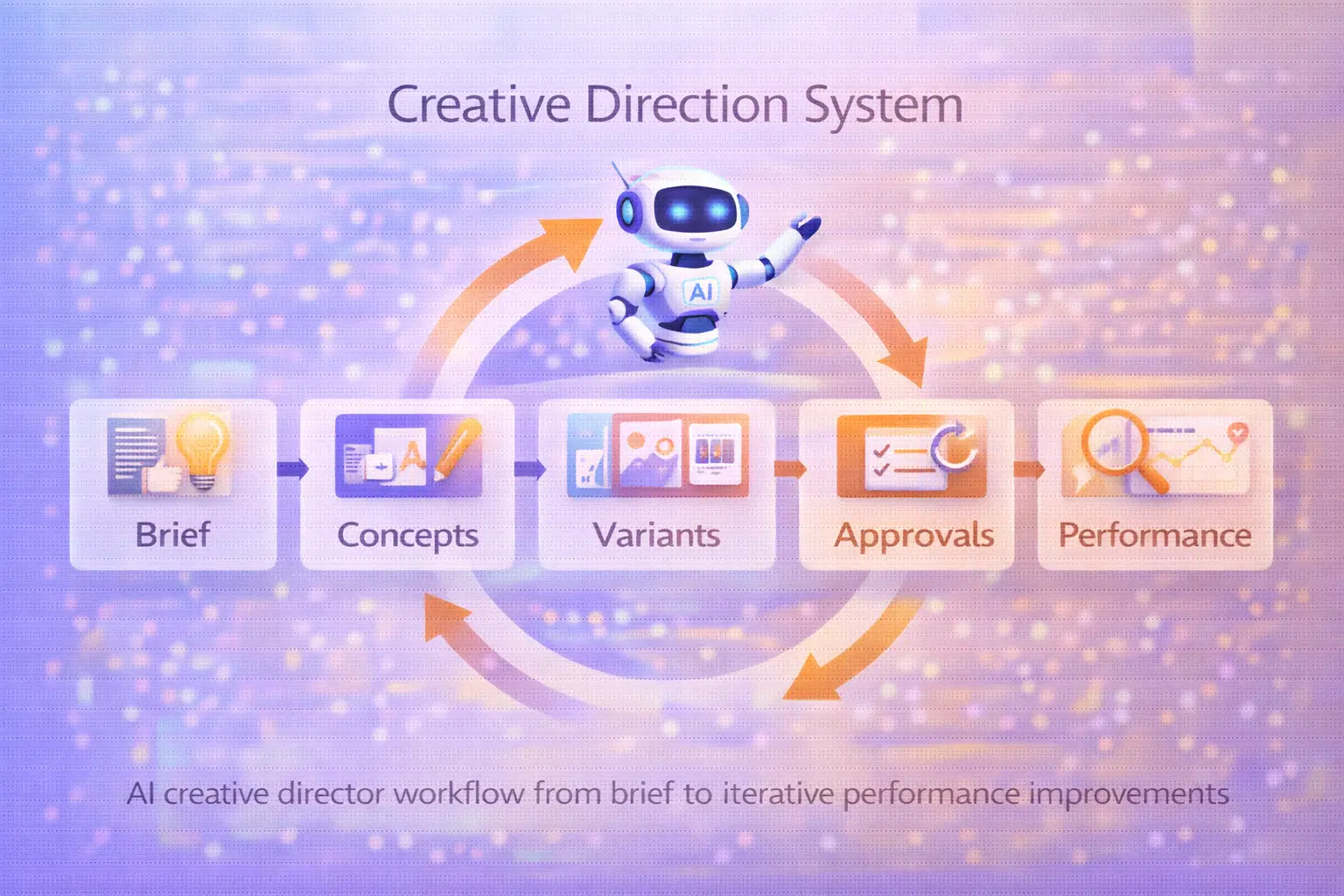
What is an AI creative director
The phrase AI creative director is used in two ways. First, as a job description: a human creative director who integrates AI into their workflow and decision-making. Second, as a system description: an AI layer that performs the types of tasks a creative director typically handles.
This guide focuses on the second framing, because that is where the real workflow change happens.
The difference between AI tools and AI creative direction:
- AI tools help you make individual assets faster.
- AI creative direction helps you manage systems, standards, and pipelines at scale.
The role of AI as a creative assistant sits between these two: it executes specific creative tasks while remaining aligned to the director’s standards and objectives.
AI as creative assistant: what that means operationally
When AI functions as a creative assistant, it handles the repeatable and the time-consuming:
- generating first drafts and creative routes
- producing size variants across platforms
- running brand checks against style guides
- summarising feedback and flagging contradictions
- identifying patterns across performance data
The creative director stays focused on what AI cannot do: taste, cultural judgement, strategy, and accountability.
AI as support for strategic creativity
The strongest use of AI creative direction is not replacing outputs. It is expanding the range of options a team can consider before committing to a direction. Faster exploration means better-informed decisions and fewer expensive late-stage revisions.
Core capabilities of AI creative director systems
An AI creative director system is defined by what it can do reliably, at scale, and within brand constraints. Below are the six capabilities that matter most for enterprise teams.
Pattern recognition in successful campaigns
AI can analyse performance data across campaigns and identify patterns in what works: visual formats, messaging structures, pacing, emotional triggers. That analysis feeds back into the next creative round.
Brand consistency
One of the most persistent enterprise problems is visual and tonal drift as teams scale. AI can enforce palette rules, typography standards, and composition norms across large asset sets.
Creative feedback and iteration
AI can cluster feedback by theme, detect contradictions in review comments, and propose structured revision priorities. This compresses the feedback loop without losing the human decisions inside it.
Rapid concept generation
Generating three creative routes in one session instead of one week changes how early creative strategy happens. Teams can align on direction before investing in full production.
Cross-platform adaptation
A single campaign concept must live across different formats, aspect ratios, and platform cultures. AI can handle the production layer of adaptation while the director governs the strategic layer.
Creative performance analytics
Connecting creative assets to performance data lets teams ask: which visual motif drives retention? Which headline structure improves click-through? AI makes that analysis faster and more actionable.

How creative directors worked before AI
Understanding the before matters because it makes the operational change visible.
Manual processes and heavy iteration
Before AI, every variant required manual production. Three creative routes meant three full production passes. Feedback rounds required designers to re-execute rather than refine. The process was slow by default.
Scaling creative was a headcount problem
To produce more output, you hired more people. There was no clean way to multiply creative production without multiplying the team. That made scale expensive and coordination complex.
Knowledge lived in people, not systems
Brand standards existed in style guides that people read once and interpreted differently. The creative director’s taste was real but hard to encode. Onboarding new team members into the visual language took time and proximity.
The AI change is not about replacing that institutional knowledge. It is about encoding more of it into repeatable systems.
How AI creative assistants change creative workflows
The shift is not from human to AI. It is from manual and slow to human-guided and faster.
AI as creative teammate
Think of AI as a junior creative that is always available, always on-brief, and never tired. It can execute instructions quickly, but it needs direction, constraints, and review. The creative director’s role shifts toward defining the brief clearly and evaluating outputs critically.
Accelerated ideation
Concept generation that took days now takes hours. That compression changes what is possible in a single sprint: more routes explored, more risks taken early, better-informed decisions before production begins.
Automation of production tasks
Resizing, background changes, variant generation, format adaptation — these are not creative decisions. They are production tasks. AI handles them consistently and at scale, freeing teams to focus on the work that requires judgement.
Reducing creative bottlenecks
The most expensive creative bottleneck is waiting: for a designer to have capacity, for a review round to close, for a variant to be produced. AI reduces wait time on the production side, which accelerates the whole workflow.
Focus on strategy over routine
When AI handles execution, the creative director’s attention can move upstream: creative strategy, brand positioning, audience insight, and the standards that govern everything downstream.
Agent Director AI: use cases for enterprise teams
Enterprise teams need clarity: who does what, how decisions are tracked, and how standards are enforced. That is why Agent Director AI is better framed as “roles and responsibilities”, not a single tool.
Below are two layers: processes (ongoing governance) and tasks (repeatable outputs).
Processes (governance and alignment)
- Brand voice management: maintain voice rules; generate copy options that respect constraints; flag risky or off-tone language.
- Creative strategy alignment: translate strategy into measurable creative hypotheses; document “what we are trying to prove” with each variant.
- Campaign narrative development: keep storytelling consistent across channels; propose narrative arcs for sequences (teasers, launch, proof, retention).
- Cross-platform creative coordination: adapt messaging to platform norms; track which formats and structures win where.
Tasks (repeatable outputs)
- Moodboard generation: style frames per route; asset libraries aligned in the same direction.
- Creative brief drafting: structured briefs with constraints and success metrics; outputs that designers and marketers can execute.
- Design feedback analysis: cluster comments by theme; detect contradictions and missing decisions.
- Creative opportunity discovery: identify gaps in the content system; propose test ideas based on performance patterns.

AI design tools most popular among enterprise creative directors
This is not a “top tools” list. Enterprise teams care about governance, security, collaboration, and repeatability. The tools below are widely used because they fit real production workflows.
| Tool | Enterprise readiness | Automation level | Creative direction support | Brand consistency | Team collaboration | Scalability | Implementation complexity |
|---|---|---|---|---|---|---|---|
| Adobe Creative Cloud + Firefly | High | Medium–High | Medium | High | Medium–High | High | Medium |
| Figma AI | High | High | Medium–High | High (systems) | Very high | High | Low–Medium |
| Runway | Medium–High | Medium–High | Medium | Medium | Medium | High | Medium |
| Midjourney | Low–Medium | Medium | Low–Medium | Medium (with discipline) | Low | High | Low |
| Miro AI | High | Medium | Medium–High (alignment) | Medium | High | Medium–High | Low |
| Phygital+ | High | High | High | High | High | High | Medium |
How to interpret the table:
- Adobe and Figma are powerful when you already live in those ecosystems.
- Miro AI supports alignment and workshops more than asset production.
- Midjourney is excellent for exploration, weaker for governance.
- Runway is a practical choice when motion is a core output.
- Phygital+ fits teams that want workflow automation and consistency across many asset types.
Industry examples of AI creative director workflows
AI creative direction is not one workflow. It depends on the team type and deliverables. Below are practical examples that map to real enterprise environments.
Advertising agency creative teams
Typical needs: rapid ideation, client alignment, many variants, heavy approval loops.
Workflow example:
- generate 3 creative routes (style frames + messaging angles)
- produce first-draft ad sets for each route
- run structured feedback collection
- scale the winning route into a full asset kit
Media production teams
Typical needs: motion, thumbnails, series consistency, fast turnaround.
Workflow example:
- generate consistent thumbnails across episodes
- build motion variations for social clips
- adapt story beats into platform-specific assets
Brand marketing departments
Typical needs: consistency, volume, multi-channel adaptation, governance.
Workflow example:
- define a campaign style system (palette, typography, motifs)
- generate a complete multi-channel kit (social, display, email headers)
- enforce brand checks before export
Digital product teams
Typical needs: UI/UX assets, launch visuals, product storytelling, design system alignment.
Workflow example:
- create launch visuals from product screenshots
- generate supporting iconography and feature visuals
- adapt the same narrative to web, social, and in-product surfaces
Challenges and limitations of AI creative assistants
AI helps, but it also introduces predictable risks. Enterprise teams need to treat these as operational concerns, not philosophical debates.
Creative intuition vs algorithms
AI can propose patterns. It cannot feel cultural nuance the way humans do. The most effective approach is to use AI to widen options early, then narrow down with human judgement.
Risk of samey content
If everyone uses the same model defaults, the internet becomes beige. The fix is in process:
- brand style rules
- reference libraries
- bespoke templates
- human creative review
Quality control and compliance
Enterprise work often includes regulated claims, legal disclaimers, and brand safety rules. AI outputs must be reviewed and governed.
Practical guardrails:
- human approval for customer-facing assets
- brand checks for visual drift
- documentation of what AI is allowed to generate
Balancing human and AI direction
The risk is not AI replacing the creative director. The risk is directors delegating taste to defaults.
AI should support the director’s standards, not define them.

Future of human + AI creative direction
The future trend is not “more AI tools”. It is role-based AI agents that execute workflows across systems, with governance and permissions.
AI agents as creative partners
Agents will act like junior producers: they will draft briefs, generate variants, prepare reviews, and summarise feedback. Creative directors will focus more on:
- creative strategy
- narrative and brand meaning
- systems design and governance
Predictive creative insights
As data and creativity become more connected, teams will increasingly ask: “What creative structure is likely to win for this audience?” and “Which visual motif drives retention?”
Prediction will not replace creativity, but it will guide experimentation.
Scaling creative operations
The biggest enterprise win is scaling without chaos:
- faster production
- clearer approvals
- more consistent brand output
- repeatable pipelines across regions and teams
The creative director role evolves from “chief taste-maker” to “chief creative operator”: defining standards and systems that produce quality at scale.
How Phygital+ supports AI creative director workflows
Phygital+ is positioned as an AI system for creative direction because it is built around workflows rather than one-off outputs. For enterprise teams, that matters: you need repeatability, collaboration, and brand consistency.
What it supports:
- AI creative automation: turn one brief into multiple asset sets
- Brand visual consistency: enforce palette, typography, and style across outputs
- Multi-channel creative production: generate assets for ads, social, web, and email
- Creative workflow automation: build pipelines that can be reused weekly
- Enterprise scaling: standardise output across teams, regions, and vendors
Relevant tools and pages:
- Phygital+ Tools hub
- AI brand visual consistency tool
- AI campaign asset generator
- Free AI Image Generator
- Free AI background changer
- Free AI advertising generator
- AI infographic generator online
Practical enterprise pipeline example:
- Upload brand assets and define style rules.
- Generate first-draft campaign routes (3 directions).
- Produce an asset kit for each direction (ads, headers, social).
- Collect feedback, summarise revisions, and refine.
- Save the pipeline and reuse it for the next campaign.
The most useful way to think about AI is not “it makes art”. It is “it makes creative direction scalable”. When you build a system where strategy becomes constraints, constraints become repeatable pipelines, and pipelines produce consistent output, AI creative director stops being a buzzword and becomes a calmer way to lead creative work at enterprise speed.
FAQ
What is an AI creative director?
It is a role-based AI system that supports creative direction by accelerating ideation, enforcing brand consistency, summarising feedback, and helping teams produce multi-channel assets faster.
Can AI replace creative directors?
No. AI can generate options and automate production steps, but it cannot own taste, ethics, cultural judgement, or accountability. It works best as a digital teammate that executes within the director’s standards.
What is an AI creative assistant?
It is an AI support layer that helps creative directors and design leads draft briefs, generate variants, manage feedback loops, and reduce production bottlenecks.
What AI tools do enterprise creative directors use?
Common choices include Adobe Creative Cloud + Firefly, Figma AI, Miro AI for alignment, Runway for motion workflows, and platforms like Phygital+ for workflow automation and brand consistency.
How does agent director AI work?
It works by assigning AI capabilities to roles (briefing, ideation, production, feedback analysis) and connecting them into workflows with guardrails, collaboration, and human approvals.