

The best AI graphic design platforms in 2026 are not “cute toy apps” anymore. They are production tools for teams that need to ship more visuals, more variants, and more channels on the same deadline. If you are a marketer, a designer, or the person who somehow became the unofficial creative director for your team, these tools can cut the slowest part of the workflow: the first draft. Used properly, they help you get to something testable fast, then refine with human taste.
What is graphic design AI in 2026
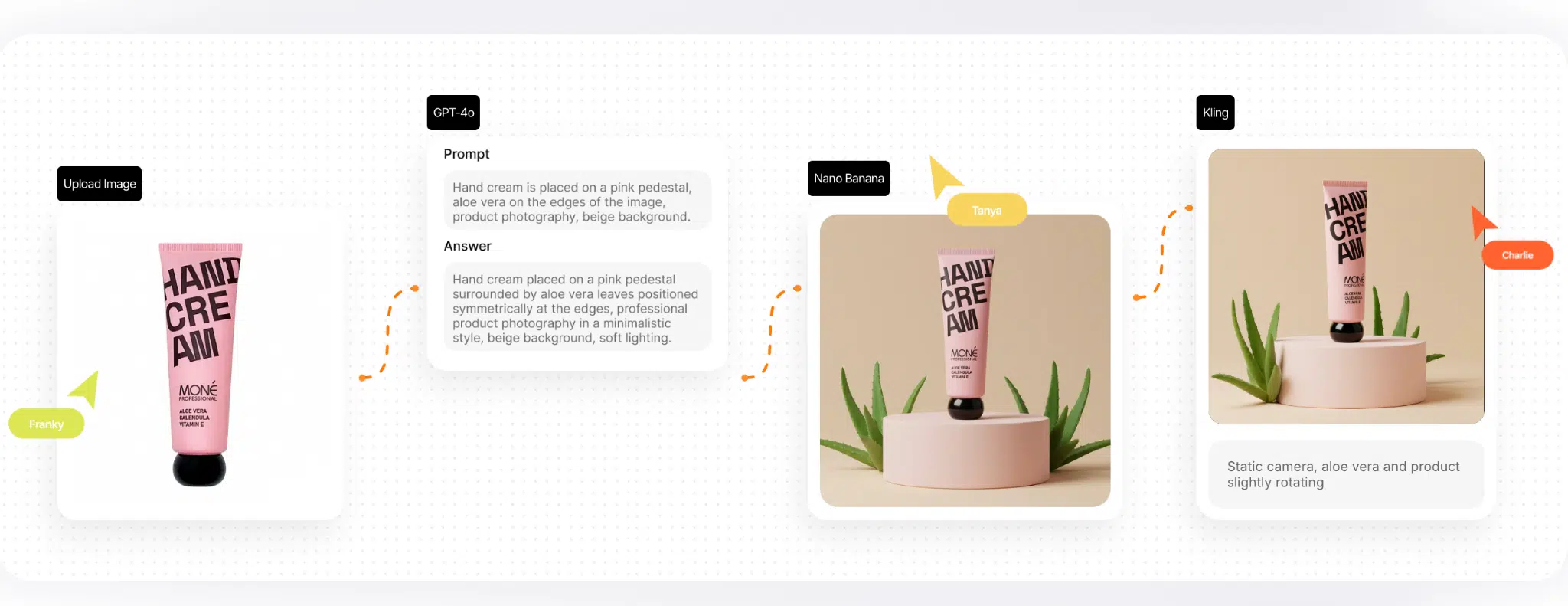
Graphic design used to be a mix of craft and repetition: craft for the first concept, repetition for the tenth banner size, the twentieth ad variant, and the never-ending social formats. In 2026, graphic design AI is the layer that reduces that repetition by generating, adapting, and refining visual assets based on prompts, brand rules, and templates.
When people say artificial intelligence for graphic design, they usually mean one of three things:
- Generative creation: produce images, backgrounds, illustrations, mockups, and style directions.
- Generative editing: remove objects, extend canvases, replace backgrounds, fix lighting, and create controlled variations.
- Design automation: create layouts, resize assets, generate templates, and adapt visuals for multiple channels.
This is also where the difference matters: generating an image is not the same thing as building a usable marketing asset. A single image can be gorgeous and still useless if it does not fit your brand, text placement, formats, or campaign needs.
Generation vs automatic graphic design
Generation is what most people notice first: “make me a poster background”, “create an illustration”, “give me five style directions”. It is a creative exploration.
Automatic graphic design is more operational. It is when a tool can take a brief, a brand kit, and some content, then output a set of assets that are already close to usable: a carousel, a story, a banner set, a thumbnail, and the platform-specific sizes. It is less glamorous than pure image generation, but it is the part that saves teams real time every week.
If your job is to create marketing visuals at scale, automation is often more valuable than a one-off image.
How we selected the best AI graphic design platforms
There are hundreds of tools claiming to be “AI for creativity”. Most are either niche, awkward to use in production, or only helpful once a month. For this expert-style review of AI tools for graphic design, we used practical criteria that match how real teams work.
Selection criteria:
- Usability for designers and marketing teams: does it fit daily work, not just demos?
- Level of AI automation: does it save time every week or just occasionally?
- Speed of visual production: can you go from brief to first draft fast?
- Scalability: can it handle multiple formats, campaigns, and team workflows?
- Team fit: collaboration, brand consistency, and repeatable templates.
We also looked at how each tool supports two distinct needs:
1. Creative exploration (generate options, moodboards, style directions).
2. Production output (turn the chosen direction into a scalable set of assets).
Because the “best” platform depends on your workflow stage, not on hype.
Best AI-powered graphic design tools (top tools)
Below are the top platforms many marketing and creative teams rely on in 2026. Each section includes what the tool is best for, the main strengths, and the limitations you should know before you build a workflow around it.
Canva Magic Studio
Canva’s Magic Studio is the most common “marketing-first” toolkit because it is built around templates, layouts, and speed. It fits the reality of marketing design: a lot of content, tight deadlines, and a constant need for resizing.
If you want a tool that supports automatic graphic design for marketing output, Canva is one of the easiest starting points.
Best for
- automatic layout generation for social posts and ads
- quick campaign assets with consistent templates
- teams that need fast output without heavy design tools
Strengths
- simple workflow for non-designers
- template-based design that scales across formats
- strong speed for day-to-day marketing production
Limitations
- high-end brand precision still needs a designer
- complex creative systems can feel constrained by templates
Adobe Firefly
Adobe Firefly is built for professional creative workflows, especially for teams already using Creative Cloud. It is strongest in generative editing: controlled changes that remove the most time-consuming steps, like background replacement, extending a canvas, or creating variations.
If your work includes a lot of retouching, compositing, or visual iteration, Firefly is a serious option for artificial intelligence for graphic design.
Best for
- professional creative workflows in Adobe tools
- generative edits and fast variations
- marketing asset refinement rather than full automation
Strengths
- integrates with professional design pipelines
- powerful controlled editing and variations
- good fit for designers who need speed without losing control
Limitations
- most valuable inside the Adobe ecosystem
- still requires designer judgment for brand consistency and structure
Figma AI
Figma is mainly known for UI/UX, but many teams also use it for graphic assets, social layouts, and marketing components. Figma AI is valuable when your workflow depends on systems: reusable components, design libraries, and team collaboration.
If you need visual AI tools that work inside a collaborative design environment, Figma AI is a strong contender.
Best for
- teams working in structured design systems
- fast layout variations inside shared libraries
- collaborative workflows where assets and feedback live in one place
Strengths
- strong team collaboration and version control
- supports scalable systems and components
- helpful for design consistency across teams
Limitations
- not a dedicated illustration platform
- results still need brand standards and accessibility checks
Runway
Runway sits on the motion and media side. It is not a poster tool. It is the platform you pick when your marketing requires motion graphics, social video, and short-form edits.
If your “graphic design” output includes video and motion, Runway expands what AI for graphics can mean in a modern marketing stack.
Best for
- motion graphics and video variants for campaigns
- fast social-first content production
- designers supporting video without a full motion team
Strengths
- strong workflow for generating and editing video
- helps teams produce more variants for testing
- useful for campaign visuals beyond static designs
Limitations
- still needs direction and taste
- best results often require iteration and editing
Leonardo AI
Leonardo AI is popular for digital art, concept exploration, textures, and stylised visuals. It is useful when you need multiple creative directions quickly, especially for brand concepts and campaign styles.
Treat it as a creative engine: generate directions, then move into tools that handle typography, layout, and system consistency.
Best for
- digital art and stylised concept sets
- exploring campaign visuals and brand directions
- creative exploration before production
Strengths
- strong output for stylised visuals and concept generation
- good for creative exploration and moodboards
- useful for building a set of visuals in one style
Limitations
- not a layout or template tool
- production assets still need design structure and formatting
Kittl
Kittl targets branding, typography, and print-style design. It is especially relevant for merch, packaging concepts, posters, and brand assets that rely on type and layout.
If your team produces typography-led marketing assets, Kittl can fit well alongside image-generation tools.
Best for
- branding assets and print-style designs
- typography-heavy visuals
- quick design automation for marketing creatives
Strengths
- strong typography and layout tooling
- useful for brand and print-inspired visuals
- supports fast template-based production
Limitations
- not the strongest choice for complex photo editing
- output quality depends on how well you set brand rules
Microsoft Designer
Microsoft Designer is the “quick answer” tool: fast marketing visuals without the complexity of professional suites. It is built for speed, especially for everyday social and ad assets.
If you are looking for an automatic graphic design tool that non-designers can operate, Microsoft Designer is a straightforward option.
Best for
- quick marketing visuals and simple layouts
- lightweight social graphics for small teams
- fast drafts for ads and promotional content
Strengths
- simple interface and fast output
- good for basic marketing graphics
- useful when you need volume quickly
Limitations
- limited depth for advanced design work
- complex brand systems require more control
Stable Diffusion
Stable Diffusion is the flexible, open-source option that advanced users love and casual users fear. It is powerful because you can customise workflows, use references, and build highly controlled outputs.
Stable Diffusion is best when you want repeatable output and control, not when you want “fast and simple”.
Best for
- advanced teams needing control and custom workflows
- consistent style pipelines using references and fine-tuning
- teams that want to own their process rather than rely on one platform
Strengths
- high flexibility and custom control
- large ecosystem of workflows and extensions
- strong option as AI software for graphic design for advanced users
Limitations
- higher setup and learning curve
- consistency requires workflow discipline
Adobe Express and visual AI tools
Adobe Express is the quick marketing design layer for teams that want speed, templates, and social outputs, often tied into Adobe’s ecosystem. It is useful for taking assets and packaging them into platform-ready formats.
If your team lives in marketing assets, Express can be a practical part of a stack of AI tools for graphic design.
Best for
- fast social and ad designs
- quick template-based marketing assets
- teams that already use Adobe workflows
Strengths
- fast output for marketing formats
- good template-based workflow
- integrates into broader creative pipelines
Limitations
- deep brand systems still need stronger controls
- not a full replacement for professional design tools
Phygital+
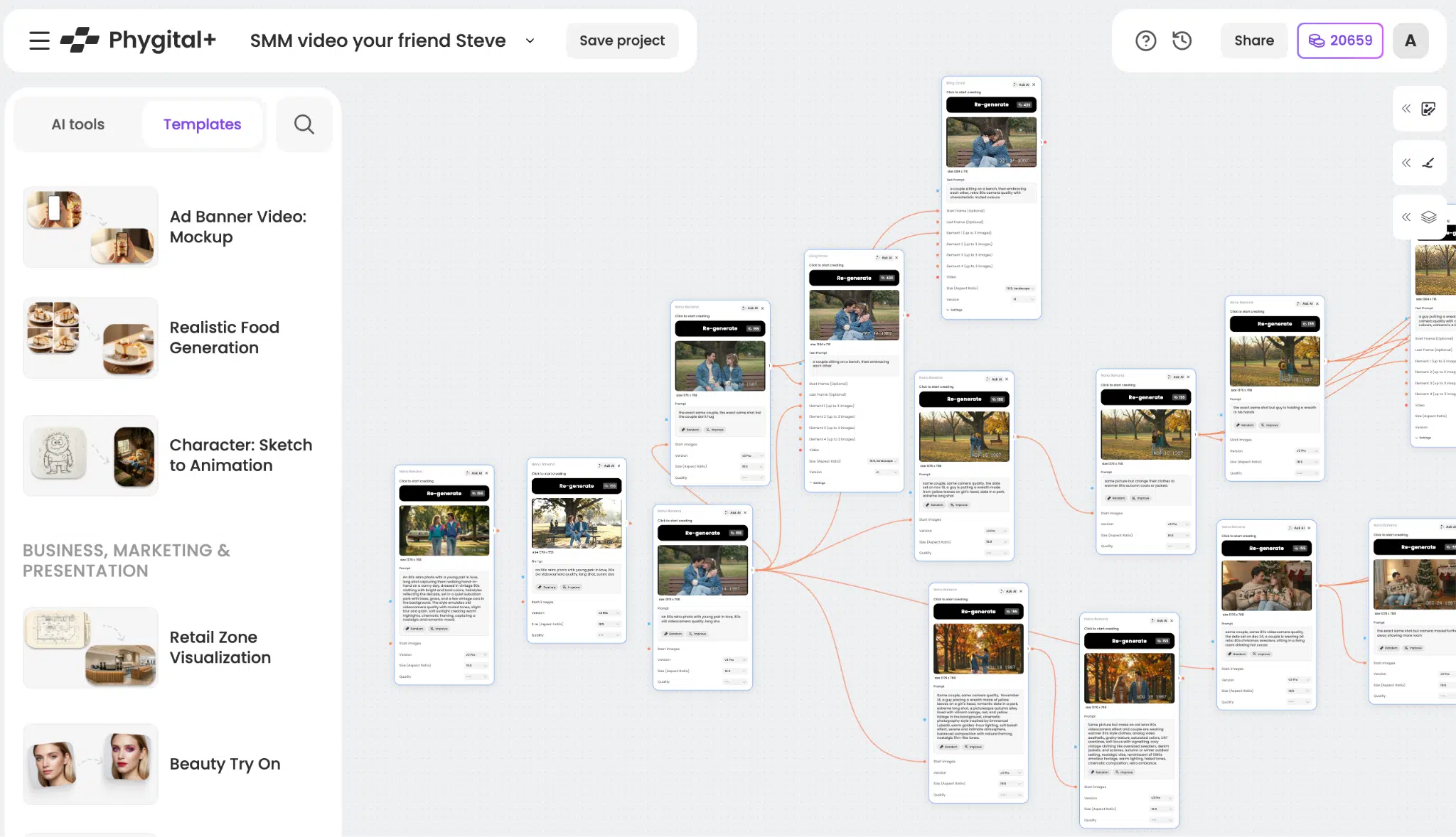
Phygital+ is best described as an AI platform for design automation workflows. Instead of treating each output as a one-off generation, it focuses on building pipelines: repeatable steps that turn a brief into consistent assets.
If you need a system rather than a pile of tools, Phygital+ is designed to help creative teams scale without losing consistency.
Best for
- automation graphic design workflows
- brand visual consistency across campaigns
- scalable multi-channel visual production for marketing teams
Strengths
- workflow automation: build repeatable pipelines, not single outputs
- brand consistency tools: keep visuals aligned across multiple assets
- multi-channel production: generate variants for different formats
- team fit: supports marketing and creative teams producing high volume
Limitations
- you get the most value when you define standards and workflows
- like any platform, it rewards process, not randomness
Comparison table: leading graphic design tools for marketing 2026
Below is a structured comparison of the tools above. It is not about “which is coolest”. It is about which tool fits your production reality.
| Platform | Primary use | AI automation level | Suitable for graphic design | Suitable for marketing teams | Ease of use | Scalability | Cost |
|---|---|---|---|---|---|---|---|
| Canva Magic Studio | templates, layouts, marketing assets | high | high | very high | very easy | high | free–paid |
| Adobe Firefly | generative edits and variations | medium–high | high | high | medium | high | paid |
| Figma AI | system-based layouts and collaboration | high | medium–high | high | medium | very high | paid |
| Runway | motion graphics and video | medium–high | medium | high | medium | high | paid |
| Leonardo AI | concept art and stylised visuals | medium | medium | medium | easy | high | free–paid |
| Kittl | typography-led branding and print assets | medium | high | high | easy–medium | high | free–paid |
| Microsoft Designer | fast social graphics and promos | medium | medium | high | very easy | medium | free–paid |
| Stable Diffusion | custom open workflows | medium–high | high | medium | hard | high | free–paid |
| Adobe Express | quick marketing formats and templates | medium | medium–high | high | easy | high | free–paid |
| Phygital+ | pipelines, consistency, scalable production | high | high | very high | medium | very high | free–paid |
How AI-powered graphic design tools improve marketing
Marketing teams adopt AI when it improves speed and output quality without breaking brand standards. The impact is easiest to see in day-to-day production.
Faster design production
Instead of starting from a blank canvas, AI generates first drafts and variations. Designers spend more time refining and less time producing repetitive versions.
Automatic creation of visual assets
Templates and automation allow you to turn one message into multiple assets: banners, stories, carousels, thumbnails, and ads. That is the practical side of automatic graphic design.
Better brand consistency
The strongest teams do not “wing it” visually. AI tools that support brand kits, reusable templates, and style rules help prevent visual drift.
Scaling design for advertising
Ads need volume. If you want to test hooks, CTAs, and audiences properly, you need more creative variants. AI makes that volume possible without exhausting the team.
Lower design costs
Cost reduction does not have to mean “replace designers”. It can mean “stop paying for repetitive work” and invest in higher-impact design: systems, campaigns, and direction.

How Phygital+ helps build scalable graphic design systems
Most teams do not struggle with creativity. They struggle with repetition, speed, and consistency across channels. Phygital+ is positioned as an AI platform for building scalable design systems through workflows.
Key ways it helps:
- AI automation workflows: build repeatable pipelines so output stays consistent.
- Brand visual consistency: keep your look stable across ads, social, and web.
- Multi-channel visual production: create assets for multiple formats without redoing work.
- Design automation for marketing teams: standardise templates and variation rules.
- Scalable creative system: reduce chaos when multiple people produce visuals.
A practical approach:
1. Define a campaign brief once (offer, audience, tone, visuals).
2. Build a pipeline that produces core assets: ad creative, social formats, web visuals.
3. Generate controlled variants for testing (not random images).
4. Keep winning formats and scale them to the next campaign.
This is the difference between “using AI sometimes” and building a system that stays useful.
In 2026, “good design” is not only about aesthetic talent. It is also about production capability: how quickly your team can create, adapt, test, and refine visuals without losing brand consistency. The best AI tools are the ones that remove friction from that process. Pick a small stack, build a workflow, keep your standards tight, and let AI handle the repetitive parts so your team can focus on creative direction and quality.
Tools and demo
Use these links to test graphic design workflows and automation.
FAQ
What are the best AI graphic design platforms in 2026?
The best platforms depend on your workflow. For template-driven marketing output, Canva Magic Studio is strong. For professional generative edits, Adobe Firefly is a practical pick. For system-based collaboration, Figma AI works well. For motion and media, Runway is useful. If you want scalable workflows and brand consistency across multiple asset types, Phygital+ is designed for that.
What AI tools for graphic design are best for marketing teams?
Marketing teams usually need speed, templates, and resizing. Canva, Adobe Express, and Microsoft Designer are easy on-ramps. Teams with higher output volume benefit from workflow-based systems that support consistency and controlled variation.
Can AI replace graphic designers?
No. AI can generate drafts, variations, and edits, but it cannot own brand strategy, ethics, taste, accessibility, or accountability. AI reduces repetitive production work. Designers still decide what is correct, useful, and honest.
What is automatic graphic design?
Automatic graphic design is when a tool creates or adapts layouts and formats automatically, based on templates, brand rules, and content. It is less about “one image” and more about producing a usable set of assets.
What AI tools are best for AI for graphics and marketing visuals?
For fast marketing visuals: Canva Magic Studio, Adobe Express, and Microsoft Designer. For professional editing and controlled changes: Adobe Firefly. For stylised concepts: Leonardo AI. For motion and video: Runway. For advanced control: Stable Diffusion.
What should I look for when choosing ai software for graphic design?
Look for automation that matches your needs: templates for resizing, brand kits for consistency, easy exports for multiple channels, and a workflow that your team will actually use every week.


