If you feel like design work has turned into “make ten variants by lunch, and also ship a prototype”, you are not imagining it. The volume expectations are real, and that is exactly why AI for designers matters in 2026. Adobe’s own research on creative professionals suggests generative AI is already mainstream in creative workflows, with speed benefits being one of the top reasons people keep using it. In practice, the best AI tools do not replace taste, judgement, or responsibility. They remove friction: they help you explore faster, document better, keep consistency, and automate the boring bits so you can spend your time on the work that actually needs a human.
What is AI for designers in 2026
In 2026, “AI for designers” does not mean one magical button that designs an app while you sip tea and pretend that is a real job. It means a set of capabilities embedded into tools you already use or can easily add to your workflow: generative image creation, text-to-UI, rapid prototyping, brand consistency automation, motion generation, and faster handoffs.
For UI/UX and product design, AI is increasingly a co-pilot:
- It speeds up exploration: early layouts, quick variations, prompt-based concept generation.
- It helps you communicate: clearer mockups, better internal documentation, faster stakeholder-ready outputs.
- It supports systems: design systems generation, component suggestions, style guides, and repeatable patterns.
The big shift is not “AI makes prettier screens”. The shift is automation. Designers are building workflows where a single brief produces a set of assets: a wireframe, a high-fidelity concept, a few visual directions, a short prototype, and the presentation-ready artefacts. That is why the phrase latest AI tools for UI/UX design automation 2026 is not just trend-chasing. It is the new baseline for teams trying to keep up.
Important reality check: AI is not a licence to stop thinking. It is best used to widen options early, then narrow down with human judgment. It makes iteration cheap. It does not make correct decisions.

How we selected the top AI design tools
There are hundreds of tools that claim to be “the future of design”. Most are either niche, half-baked, or useful once a month. For this list of AI tools for designers 2026, we selected tools using practical criteria:
- Real use in UI/UX and product design (not just art demos)
- Level of automation (does it save time every week?)
- Team fit (collaboration, consistency, governance)
- Relevance in 2026 (active updates, growing adoption)
- Output quality (useful files, not just screenshots)
We also looked at how well each tool supports a modern designer workflow: ideation, prototyping, visual production, and team scaling. A tool that only generates pretty images can still be valuable, but it should earn its place by making your process faster or improving your output.
Small note on AI tools for designers news: the space moves fast, and pricing models change quickly (credits, usage limits, enterprise tiers). A tool can be great today and annoying tomorrow. The goal is not to worship any single platform, but to build a stack you can adjust.
Top 10 AI tools for designers 2026
Below are the tools designers keep coming back to for UI/UX, product design, and creative production. Each tool is listed with practical strengths, limitations, and who it suits.
1. Midjourney
What it is used for: high-quality concept art, moodboards, style exploration, campaign visuals, and fast visual directions.
Strengths
- Extremely strong aesthetic output for concept exploration
- Great for generating multiple art directions quickly
- Useful for early brand and visual language discovery
Limitations
- Not a UI tool. You will still need to translate concepts into components and systems.
- Consistency requires discipline (references, style rules, and careful prompting).
Best for
- UI/UX designers who need quick visual directions for product themes
- Creative leads producing style frames for marketing and media
- Teams needing fast moodboards for AI tools for creative projects
Tip: treat Midjourney output as “visual thinking”, not final assets. Use it to align stakeholders on tone and direction early.
2. Figma AI
What it is used for: AI-powered design generation, rapid prototyping, design systems support, and in-tool automation.
Strengths
- Lives inside the tool many teams already use
- Helps speed up early layout exploration and variations
- Supports workflows around systems and scalable UI
- Collaboration-friendly by design
Limitations
- AI features often use credits and have usage limits
- AI suggestions still need a designer’s eye for accessibility, edge cases, and real product constraints
Best for
- Product designers working inside established design systems
- Teams building scalable UI patterns and prototypes
- Designers who want AI tools for product design that fit a normal workflow
Tip: the real value is not “generate a screen”. It is “generate a reasonable draft, then iterate faster with less manual grind”.
3. Galileo AI
What it is used for: text-to-UI generation, quick interface drafts, and fast prototyping.
Strengths
- Strong at turning written requirements into UI layouts
- Useful for breaking blank-page paralysis
- Speeds up ideation and early flows
Limitations
- Output still needs refinement to match your design system
- The more specific your product constraints, the more hand work you will do
Best for
- UX designers who need quick screen drafts from a brief
- Product teams in early exploration
- Designers who want to propose multiple directions without rebuilding everything manually
Tip: use Galileo AI to generate options, then reassemble the best bits into your actual system.
4. Runway
What it is used for: AI video generation, motion design assistance, storyboards, and creative production for campaigns.
Strengths
- Strong motion tools for designers working on media and product marketing
- Useful for social content, product teasers, and motion experiments
- Helps non-motion designers create presentable motion faster
Limitations
- Video workflows still require taste and direction
- Not every generated clip will be production-ready without edits
Best for
- Product and brand designers creating motion assets
- Creative teams shipping social-first content
- Designers working on top generative AI for digital art and media 2026 outputs
Tip: Runway is easiest to justify when your team already needs video but lacks time or specialist bandwidth.
5. Leonardo AI
What it is used for: digital art, concept generation, textures, and stylised creative outputs.
Strengths
- Strong for stylised concept generation and asset exploration
- Useful for game, media, and brand concept work
- Often easier to steer towards specific aesthetics
Limitations
- Like Midjourney, it is not a UI tool
- Consistency across a system still needs rules and references
Best for
- Designers working on digital products with strong visual identities
- Creatives building concept art for campaigns
- Teams needing AI tools for creatives to explore style quickly
Tip: treat Leonardo AI as a creative engine for directions, then move to vector, component, and system tools for production.
6. Uizard
What it is used for: quick wireframes, sketch-to-wireframe conversion, and rapid prototyping.
Strengths
- Strong for low-friction prototyping and stakeholder workshops
- Turns sketches and screenshots into editable mockups
- Great when you need to communicate quickly rather than perfect the pixel
Limitations
- Not ideal for final production UI
- Designs often need cleanup to match real systems
Best for
- Designers running workshops and early discovery
- Product teams needing fast mockups
- Anyone building quick prototypes without a heavy setup
Tip: If your stakeholders love drawing on whiteboards, Uizard can save you hours of translation work.
7. Adobe Firefly
What it is used for: generative image creation, editing, and creative workflows inside the Adobe ecosystem.
Strengths
- Integrates into Adobe workflows that many designers already have
- Useful for Generative Fill-style edits, background changes, and fast variations
- Helpful for producing marketing visuals with less manual compositing
Limitations
- Results depend heavily on the input and the editing goal
- If your workflow is not in Adobe tools, Firefly might feel like a detour
Best for
- Designers working in Photoshop/Illustrator/Express pipelines
- Marketing and communication designers are producing lots of variants
- Teams needing fast asset variations for campaigns
Tip: Use Firefly for controlled edits and variations, not for building complex UI systems.
8. Relume AI
What it is used for: sitemaps, wireframes, style guides, and component-based website building workflows.
Strengths
- Speeds up website structure creation (sitemaps and wireframes)
- Supports system thinking and repeatable patterns
- Helpful for marketing websites and product pages
Limitations
- Best suited to web and marketing site workflows
- You still need design judgment and brand adaptation
Best for
- Designers building marketing sites and landing pages
- Teams that need structured layouts fast
- Anyone who wants component automation without starting from a blank canvas
Tip: Relume AI is strongest when you already know the content and goals, but need a fast structure.
9. Stable Diffusion
What it is used for: open-source image generation, custom workflows, fine-tuning, and advanced creative pipelines.
Strengths
- Highly flexible: you can run it locally, customise models, and build precise workflows
- Good for teams that need control and repeatability
- Strong ecosystem of extensions and community workflows
Limitations
- Higher complexity and setup effort
- Quality and results depend on your pipeline and model choices
Best for
- Advanced designers and creative technologists
- Teams that want custom model control
- People are building highly controlled pipelines for AI tools for creative projects
Tip: Stable Diffusion shines when you want repeatable output and custom control, not when you want “fast and simple”.
10. Phygital+
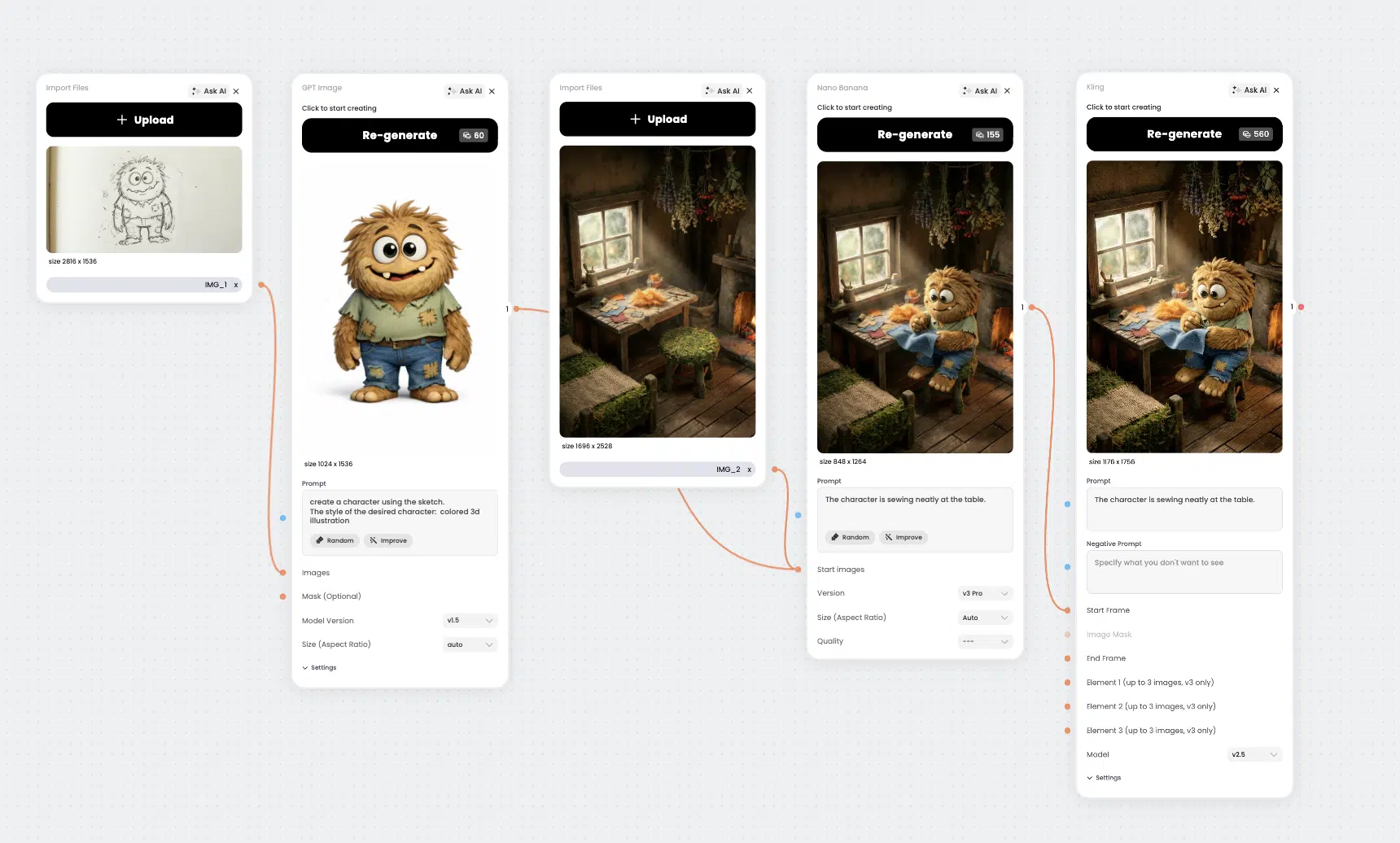
What it is used for: automation design workflows, visual consistency, multi-tool pipelines, and scalable creative production.
Strengths
- Built around automation workflows rather than single outputs
- Helps keep brand visuals consistent across multiple assets
- Combines multiple tools/models in one workspace
- Supports team collaboration and repeatable pipelines
Limitations
- To get the most value, you need to define your workflow and standards
- Like any platform, it works best when your team commits to a process
Best for
- Lead designers building repeatable pipelines
- Teams needing consistent visuals across campaigns and product assets
- Designers who manage output volume and want AI tools for managing design interns and teams through a clearer workflow
- How it fits a modern workflow:
- Turn one brief into multiple assets: UI visuals, headers, icons, and variations
- Standardise look and feel for consistent output
- Reduce time lost to downloading, re-uploading, and version chaos
Comparison table: top AI design tools
Below is a quick comparison of the tools above. The aim is clarity, not marketing hype.
| Tool | Main purpose | Automation level | Complexity | Good for UI/UX | Good for product design | Team collaboration | Scalability | Cost |
|---|---|---|---|---|---|---|---|---|
| Midjourney | Concept art, moodboards, visual directions | Medium | Low–Medium | Limited | Medium (concepts) | Limited | High | Paid |
| Figma AI | UI generation, prototypes, system support | High | Low–Medium | High | High | High | High | Paid (credits/tiers) |
| Galileo AI | Text-to-UI drafts and fast ideation | Medium–High | Low–Medium | High (early stages) | Medium | Medium | Medium | Paid |
| Runway | Video and motion generation workflows | Medium–High | Medium | Medium (presentations) | Medium | Medium | High | Paid |
| Leonardo AI | Digital art, stylised concepts | Medium | Low | Limited | Medium (concepts) | Limited–Medium | High | Free–Paid |
| Uizard | Wireframes, sketches → mockups | High (early) | Low | High (early stages) | Medium | Medium | Medium | Free–Paid |
| Adobe Firefly | Generative edits, asset variation | Medium | Medium | Medium | Medium | Medium | High | Paid (subscriptions/credits) |
| Relume AI | Sitemaps, wireframes, style guides | High (web) | Medium | Medium (web UX) | Medium | Medium | Medium–High | Paid |
| Stable Diffusion | Custom workflows, open-source generation | Medium–High | High | Medium | Medium | Medium | High | Free–Paid |
| Phygital+ | Workflow automation + consistency + multi-tool | High | Medium | High | High | High | High | Free–Paid |
AI automation workflows for lead designers UI/UX
Tools are not the point. The workflow is. Below is a practical automation workflow that lead designers can use to scale UI/UX and product design output without turning the team into a factory of random screens.
1) Research support (faster synthesis)
AI helps summarise interviews, cluster feedback, and extract patterns. The key is to keep the raw data accessible and treat AI summaries as a draft, not the truth.
Practical outputs:
- interview summary bullets
- recurring pain points grouped by theme
- early opportunity statements
2) Ideation (cheap variation)
Use AI to explore multiple directions quickly: layout ideas, navigation models, feature flows, and visual language references.
Practical outputs:
- 5 flow options for onboarding
- 3 navigation patterns to test
- moodboards for visual direction
3) UI generation (from brief to draft)
This is where tools like Figma AI, Galileo AI, or Uizard shorten the blank-page phase.
Practical outputs:
- first-pass UI screens
- wireframes linked into a flow
- early prototypes for stakeholder feedback
4) Review and handoff (less friction)
AI can help you write specs, generate microcopy variants, and check for consistency across components.
Practical outputs:
- component naming and documentation drafts
- microcopy options aligned to tone
- handoff notes structured for engineers
5) Scaling team processes (systems, not chaos)
The most valuable automation is standardisation:
- reusable pipelines for asset generation
- shared prompt libraries and brand rules
- templates for common flows and presentations
This is also where AI tools for managing design interns and teams become real: you reduce “guesswork”. Juniors and interns can execute within guardrails, and leads review with clearer standards.

How Phygital+ helps scale design teams
Phygital+ makes the most sense when your bottleneck is producing consistent assets across channels and products. In 2026, design teams rarely ship only UI screens. They ship design systems, marketing assets, motion snippets, icon sets, and brand visuals, often under tight timelines.
Phygital+ supports scaling by focusing on workflow automation:
- Automation workflows: turn repeatable tasks into a pipeline (brief → assets → variations).
- Brand consistency: keep style consistent across campaigns, product visuals, and supporting graphics.
- Creative production automation: generate multiple asset variants quickly for testing.
- Multi-channel outputs: produce assets for different formats without manually redoing everything.
- Design pipeline integration: keep work in a single workspace, reduce file chaos.
Practical examples:
- Create a campaign set: header image + icon set + social cards in one style.
- Produce product visuals for a feature launch: consistent UI mockups + background variations.
- Build a “junior-friendly” pipeline: interns follow a pre-built workflow, leads review.
If you are looking for AI tools for product design that scale beyond one-off generation, this is the approach: pipeline over prompts.
The best design stacks in 2026 are not “tool collections”. They are systems. Use AI to speed up research synthesis, expand ideation, generate first drafts, and standardise production. Then apply human judgement to make the work coherent, usable, and honest. If you build a workflow where briefs reliably become polished outputs, you will ship faster, stay consistent, and spend less time fighting your own process.
Tools and demo
Use the links below to test generators and build your own AI-assisted design workflow.
FAQ
What are the best AI tools for designers in 2026?
For UI/UX and product design workflows, start with Figma AI for in-tool automation, add a text-to-UI generator like Galileo AI or Uizard for faster early drafts, and use a visual production system like Phygital+ for consistent multi-asset output. For creative direction and concept work, Midjourney and Leonardo AI stay strong. For motion, Runway is one of the most practical picks.
Which latest AI tools for UI/UX design automation in 2026 are most useful?
The most useful tools are the ones that reduce time-to-first-draft: Figma AI for system-based drafts, Uizard for wireframes from sketches, and Galileo AI for text-to-UI. The value is not the first screen. It is the speed at which you can test and iterate.
Can AI replace designers?
No. AI can generate options and automate production steps, but it does not own product strategy, ethical judgment, accessibility responsibility, stakeholder alignment, or quality standards. It speeds up the work. It does not replace the role.
What AI tools for creatives are best for digital art and media?
For top generative AI for digital art and media 2026 workflows, Midjourney and Leonardo AI are great for visual direction and concept sets, Stable Diffusion is best for custom pipelines and control, and Runway is the practical choice when you need motion and video output.
How do AI tools improve creative workflows?
They make iteration cheaper. You can explore more options early, produce variants for testing, and automate repetitive production tasks. The best teams use AI to protect designer attention for higher-value thinking, not to flood the world with average outputs.