When I first started experimenting with AI video generators, it felt a bit like magic tricks. You typed a prompt, pressed generate, and waited to see what the model decided to do. Sometimes it worked beautifully.
Now, with the latest update for Kling 3.0 in 2026, the whole thing has moved even further into what feels like early-stage AI filmmaking. Characters breathe, fabrics move, camera angles shift, and scenes often feel closer to something you’d expect from a realistic video shoot.
Kling often performs best when you treat it like a virtual camera crew. Instead of simply describing an image, you describe a scene being filmed. When you approach this AI like a film director, the model suddenly feels much more cooperative.
In this article I will help you get through your first realistic AI video generation. So we will touch upon:
- how to write prompts for video generation that actually produce cinematic results
- practical prompt structure advice and top classic camera movement prompts
- using AI for the real workflows in creative teams, marketing and content
Kling 2.6, 2.5 and 3.0 – which version to use
First, we should take a brief step back and look at how big a jump we are really talking about when comparing the latest available models of Kling 2.5, 2.6, and 3.0. Namely the best AI for realistic video generation today.
My work buddy, a design tool named Phygital+, helps me to create a unified pipeline for testing and keep it clean and simple, all in a single interface. It’s my go-to website to create visuals of all kinds, combining different AI models for my creations.

We will use one standard prompt for a fair test, combining our instructions for camera movement, lighting situation and, more importantly, subject movement. The model’s output differs in length allowance, so to keep it consistent, I’ll adapt the output length to be the same for every model: 5 seconds. Kling’s newer video models can go longer, but keeping every clip at five should make the comparison more consistent and detailed.
The biggest challenge for me is always the “how” part of the prompt, when I need to describe more technical details. When recreating camera movement for, let’s say, a cinematic video ad scene I prefer it steady and laconic.
Here is the exact prompt I used for all three generations:
The camera orbits around, starting from the back, at the same distance while the ninja overlooks the city. Ninja is still, the camera spins around him 180 degrees. The camera stops spinning when it reaches his facing position. Hyper realism, cinematic lighting from neon signs below, dramatic atmosphere, ultra detailed, shallow depth of field, cinematic, 16:9, HD
Let’s start the actual generation, warm up Kling models. I will use a start frame feature by adding the image generated with Phygital+, from a previously created image-generation prompt. Image to video generation in Kling works really well and saves the words.
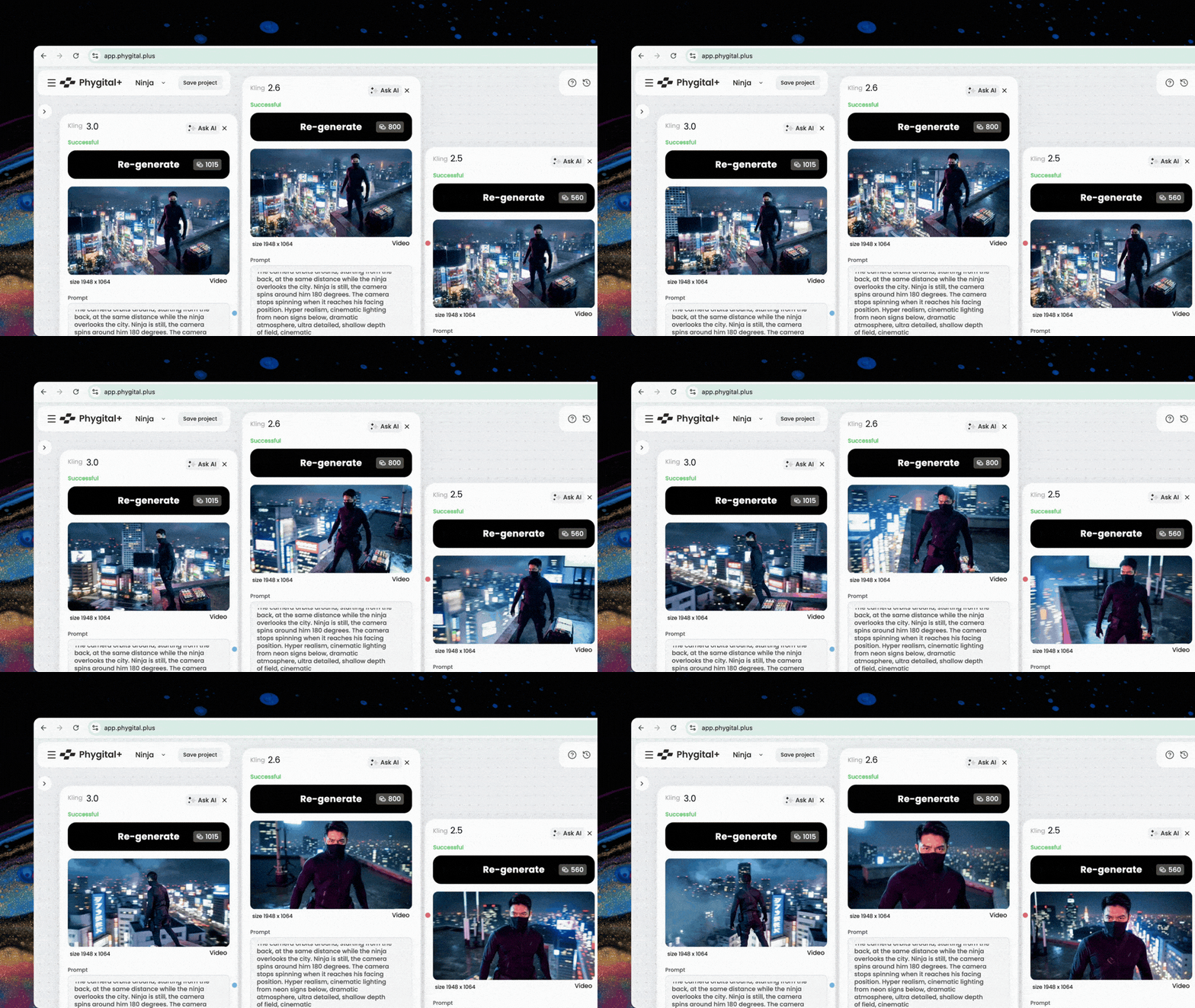
The output video – our result of generation – is decent in each case. Yet there is always room for improvement. For my idea, I would consider 2.6 the winner, as it hits the sweet spot between generation price and video quality. I also find it to be the most dramatically correct.
Summing up, Kling 2.5 Turbo is a budget-friendly model with great drafting-stage qualities. Kling 2.6 is a newer video generator, with improved visual quality and audio capabilities, although I did not use the audio mode for today’s demonstration. And version 3.0 is the most advanced cinematically – allowing more dynamic scenes with a bit of magic and some advanced camera movement prompts for Kling. While Kling O1 was not part of this test, it is worth mentioning as a multimodal model, designed for a broader range of tasks, such as the rare video editing.
How to use Kling AI for image-to-video generation
In Kling you can create both text-to-video and image-to-video clips. I find the second option more convenient, because it gives more control over the result before the generation even begins. One thing is for sure: everyone finds their own flow.
When people want to build a connected visual sequence they often rely on storyboarding – scene-by-scene plan for filming a movie, ad campaigns, music videos, or even complex social media clips. Same here: it makes sense to approach the AI video prompt with a director’s intent. Lights, camera, action!
Using multi-shot, frames and elements in Kling
Kling 3 supports video generation up to 15 seconds. That may not sound long, but it is enough to do quite a lot – from short motion animations to story-based trailers. Luckily, there is also a built-in set of control tools to help navigate the generation.
- Multi-Shot in Kling 3 lets you build a sequence of up to roughly six shots, depending on their length. This gives you much more control over the structure of the video, its pacing, and what exactly happens on the screen. More complex scenes are often better moved into Multi-Shot.
- First Frame and its natural counterpart Last Frame let you define the point the video should arrive at or the closing image. When creating a scene about running late for a train, the final frame will tell us whether they made it or not. That gives a clearer destination to a generation model.
- Elements is a surprisingly useful tool when you need consistency from frame to frame for a face, an object, or other detailed visual reference. This can mean making your own Harry Potter AI-movie the way you like, or simply ensuring a main character’s face in your generated ad does not drift. Lock your key visual traits with elements.
Kling control tools can be used separately or together. Once you understand the opportunities Kling gives you, the next step is learning how to get the result you actually want from the model – through a strong prompt.
Write better prompts for Kling AI: cinematic intent and basics
Prompts for Kling are nothing like requests to a chatbot. Kling’s prompt guide describes prompting more similar to directing: define the subject, the movement, the scene, the camera language, the lighting. Sounds technical. But also translates to:
- who or what is in the shot
- what it does
- where it happens
- how the camera sees it
- what kind of light shapes the scene
A very important thing. Prompt tone matters, but no need to ask for a video nicely. Prompts tend to work better as a sequence of nouns, adjectives, and verbs: what is in the scene, what it does, how the camera sees it, what kind of scene is this.
It works better to keep the prompt length around 3 to 6 sentences. A well-balanced generation request is long enough to describe the shot, yet short enough to stay readable and avoid overcomplicating. Even in more advanced prompting – many sophisticated scenes work well at around 50 to 100 words tops.
Camera direction is worth stating clearly. Give camera movement commands in clearly separated sentences. You can add your preferences for shot type, speed, and focus directly to the prompt. If the idea is complex, it is often more productive to break it into smaller parts.
You can spend a very long time looking for the perfect prompt that matches the idea in your head with the result on the screen. But Kling suddenly becomes more useful when you start treating it like a mini-team. Toss in ChatGPT or Gemini to help out with prompts and reference images, and you have a multi-tool for creators, filmmakers, marketers who work solo or with growing creative projects.
Prompt structure for Kling AI
As a rule of thumb, it helps to cover at least Subject + Context as a minimum for predictability. If the result needs to feel more controlled, you can add style and lighting.
| Element | Description | Tips | Examples |
|---|---|---|---|
| Subject | The main character of the shot — person, object, or product. | Use commands, not conversational requests. A few defining attributes. | “one adult woman” “an old mechanic” “a glass bottle” |
| Action | What the subject does. Movement is a well-controlled part of the prompt in Kling. | Usually a verb. Add physical details, speed or motion modifiers. Separate subject movement from camera movement. | “walks down the corridor” “turns around slowly” “fingers moving quickly across the strings” |
| Scene | Where the action happens: setting, atmosphere, time of day. | Keep it short and concrete. One or two sentences. Or use image-to-video. | “a rainy city at night” “morning fog on a bridge” “a dark music studio” |
| Camera | How the camera sees the scene: framing, angle, trajectory, movement. | Define shot type and camera movement. With Multi-Shot in Kling 3, time cues can be added. | “medium shot” “close-up at eye level” “the camera slowly dollies in” “at the 8th second, the camera zooms” (v3.0) |
| Lighting | The final control layer that shapes mood and finish. | Style as a label, lighting as a separate phrase or sentence. | “style: TV food commercial” “golden sunset light” “cool blue shadows” “studio professional lighting” |
Once you know the basic structure, it becomes easier to adapt the prompt to different creative tasks. The same building blocks can bring to life very different results, from a music video to a product advertisement.
13 Kling AI video prompts with results
These prompts work best as a starting structure. Something you can adapt to your idea, taste, scene, your product, your music without having to invent the logic from scratch.
Cinematic scene
A young woman in a dark wool coat stands on an empty train platform at dawn. She looks up, then turns as the train doors begin to close behind her. Cold morning fog hangs in the air, the platform lights still glowing softly. Medium shot at eye level. The camera slowly dollies in as her expression changes from hesitation to resolve. Cool blue-grey light, cinematic realism.
Action sequence / dialogue
A man and woman stand across from each other in a small underground parking lot. One steps forward, the other tightens their grip without speaking. The air feels still, but the tension is visible in their posture. Medium shot. The camera slowly circles them in a controlled arc. The woman says: ‘today I will drive’. Harsh industrial lighting, realistic cinematic tension.
Office chase
A young man speeds through the office sitting in an office chair. He moves fast through a long office corridor, glancing back over his shoulder while papers scatter behind him. He pushes open a glass door at the end of the hall and disappears through it. Bright modern office interior, reflective floor, tense atmosphere. Camera tracking shot from behind, a quick forward push as he reaches the door. Crisp lighting, realistic motion blur.
Product marketing
A frosted glass skincare jar sits on a pale stone pedestal surrounded by water ripples and soft white fabric. The lid opens slightly as light moves across the surface of the product. Clean studio environment with airy, minimal styling. Medium close-up. Slow dolly-in with a slight top-down tilt. Fresh daylight look, soft shadows, high-end beauty campaign style.
Social media clip
A young woman steps into frame, adjusts the collar of an oversized blazer, and turns once toward the camera. The background is a brick textured wall in soft daylight. Full-body shot. Fast, smooth push-in with a slight handheld feel. Crisp urban fashion lighting, short-form social content style.
Fantasy cinematic
A woman on horseback rides across a quiet ridge under a full moon, her cloak lightly moving in the wind. The landscape stretches into the distance with silver fog hanging over a valley full of glowing flowers below. Wide shot, then a slow side tracking move. Cool moonlight, dramatic shadows, epic cinematic style.
Urban lifestyle
Two male friends stand on a rooftop at sunset, talking casually while the city skyline glows behind them. One laughs and leans on the railing as the other turns toward the horizon. Medium-wide shot. Slow handheld movement with a subtle orbit. Golden sunset light, relaxed editorial lifestyle mood.
Tech product ad
A sleek wireless earbud case opens on a dark matte surface while soft blue interface reflections move across the background. The product feels precise, minimal, and futuristic. Macro product shot. Slow dolly-in with a slight side shift. Clean cool lighting, premium tech campaign style.
Beverage ad
A chilled sparkling drink is placed onto a bright summer table as sunlight hits the bottle and bubbles rise inside. Small drops of water run down the label. Close-up product shot. Quick smooth camera push-in, then hold. Bright natural light, fresh seasonal ad mood.
AI storytelling
A phone lights up on a kitchen table with a missed call notification while someone stands motionless in the background, out of focus. The only movement is the slight trembling of their hand. Quiet apartment interior at night. Start on the phone in close-up, then shift focus slowly to the person behind it, face becomes visible, showing fright. Low warm practical lighting, intimate dramatic tension.
Music video concept
A performer stands still in a dark room while pieces of black fabric move in the air around them as if suspended underwater. They slowly face the camera, raising their head and begin to sing. Medium-wide shot. Slow circular camera movement. Cool blue light, ethereal atmosphere, poetic music video aesthetic.
Camera tracking
A skateboarder moves through an empty parking lot at sunrise, pushing off once and gliding forward. Wide shot. The camera tracks alongside at matching speed, staying low to the ground. Crisp morning light, realistic motion, urban.
Lighting & atmosphere
An old restaurant kitchen late at night, stainless steel counters, faint steam in the air, one cook standing alone near the stove. Minimal movement. Static medium shot. Warm tungsten light, deep shadows, slight haze, intimate cinematic realism.
Multi-shot prompt example
Shot 2: He runs his fingers across a row of vinyl covers and stops at one particular album. Medium close-up, slow side camera slide.
Shot 3: He places the record on the counter and smiles faintly as the shop owner looks up. Medium two-shot, gentle dolly-in, nostalgic atmosphere.
For prompt refinement and iteration it is best to change one layer at a time. That means adjusting either the style or the movement in a single iteration, not both at once. This is really about refinement – when you already have a base to work with.
FAQ
How to make faces more consistent frame to frame in Kling videos?
Use the Elements feature. Keep the clip short, avoid extreme angle changes, reduce fast motion, and use a reference image. Matching your references matters a lot, especially if you provide Start and End Frames.
Why does Kling ignore my prompt?
Usually because the prompt is trying to do too much at once. Kling’s own prompt guide is built around a simple structure: Subject, Movement, Scene, Camera Language, and Lighting. The model tends to prioritize the signals by importance, especially the subject, motion, and background.
What aspect ratios does Kling support?
The standard supported aspect ratios are 16:9, 9:16, and 1:1. In practice, that covers most common needs: 16:9 for YouTube, websites, and cinematic horizontal work; 9:16 for Reels, TikTok, and other mobile-first formats; and 1:1 for square social content.
When should I use Motion Control instead of a normal image-to-video prompt?
A standard image-to-video prompt works well for broad direction – describing the subject, its position, and the scene – but the Motion Control feature in Kling is capable of dealing well with facial expression and body motion, where movement accuracy matters. Video can also be used as reference for models. Some users also mentioned that Kling is not great at specific dances, for example twerk and some national traditional dances.
What is the difference between Kling 3.0 and Kling 3.0 Omni?
Kling Video 2.6’s successor is the newest Kling Video 3.0. While Kling Video O1 was upgraded to Kling Video 3.0 Omni. The split: version 3.0 is the main generative model, while Omni is a multimodal tool, best for reference-based control, working with existing images, video, elements, and editing real videos.