Sketch to Animation
Upload a sketch, generate a character, place it into a scene, and animate the final shot.
Sketch to Character
Scene Integration
Animation Export
Template Snapshot
Best for: creative teams, game/character artists, social marketers
Input: sketch/image + character setup + scene reference
Output: composited scene and short animated clip
Models: GPT Image / Nano Banana / Kling
Steps: 4
About This Template
Sketch to Animation converts a hand-drawn character into a styled scene and then animates the final shot. It is designed for creators, storytellers, studios, and marketing teams that need quick character-based content without full 3D production.
Typical workflow uses GPT Image (or Nano Banana) for character and scene integration, then Kling for animation generation from the composed frame. The same node logic can be reused for new characters, scene variants, and episodic content while preserving style consistency.
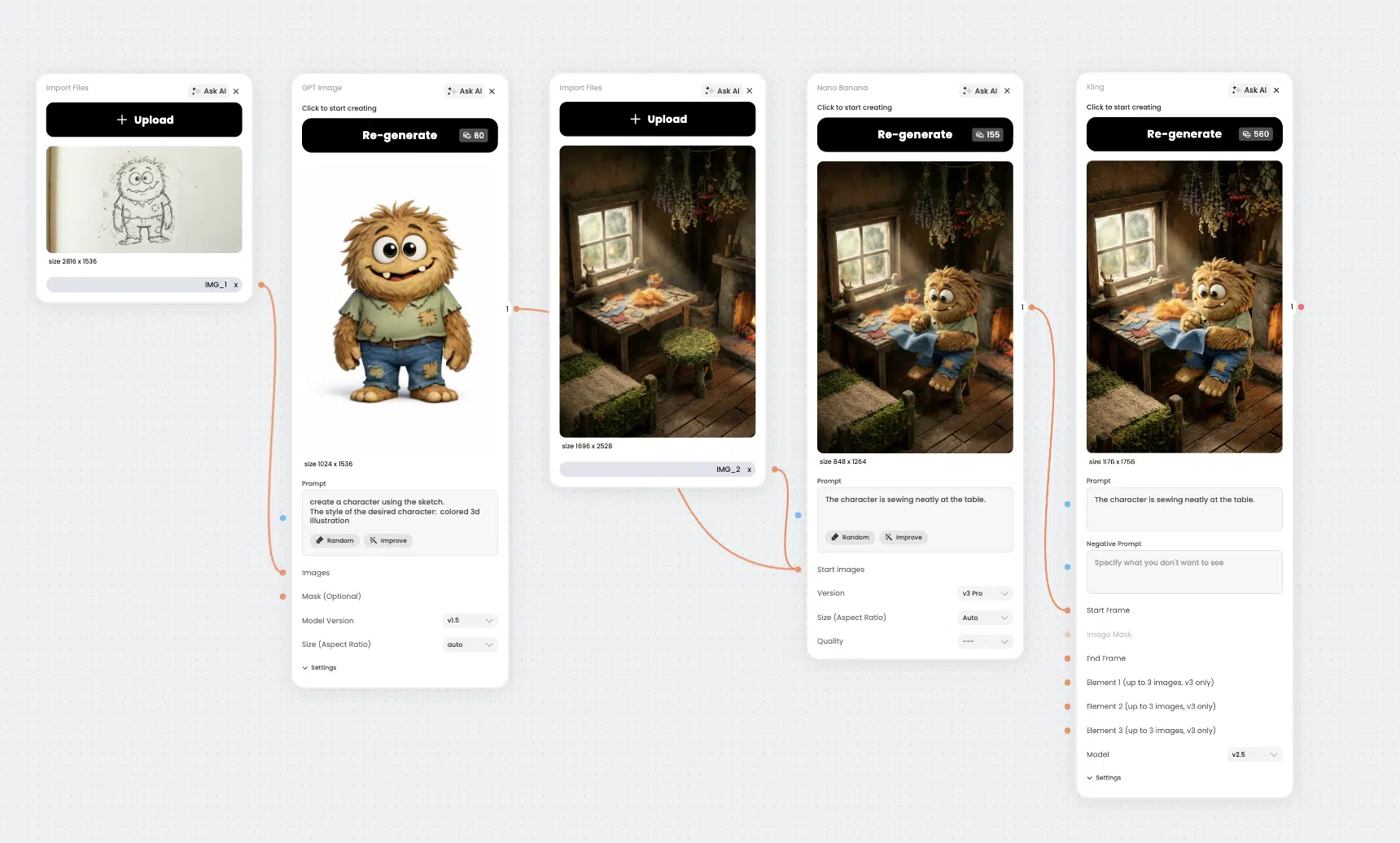
How It Works:
1
Upload your image
Upload the original sketch or drawing that will be used as the character source.
2
Create a character
Generate a consistent character from your sketch while preserving the original style and shape.
3
Upload your scene
Add your product image (preferably transparent PNG) so the template can align scale and perspective correctly.
4
Put the character in the scene
Use prompt guidance to place the character naturally in perspective, lighting, and composition before animation. Then animate the composed scene in Kling to produce the final motion output.
FAQs
What is Sketch to Animation?
Sketch to Animation is a Phygital+ template that transforms a sketch into a character, places it into a scene, and generates an animated output.
Who is this template for?
It is for content creators, animation teams, marketers, and educators who need fast character storytelling visuals and motion clips.
Which neural networks are used?
The flow typically uses GPT Image or Nano Banana for character/scene generation and Kling for the final animation stage.
How many steps does it take?
The full workflow has 5 steps: upload image, create character, upload scene, place character in scene, animate scene.
Sketch to Character
Scene Integration
Animation Export
Template Snapshot
Best for: creative teams, game/character artists, social marketers
Input: sketch/image + character setup + scene reference
Output: composited scene and short animated clip
Models: GPT Image / Nano Banana / Kling
Steps: 4

User Feedback