Home / Phygital Team Credits

New era of teamwork in Phygital+

Phygital+ continues to simplify access to AI tools for professionals. From now on any Phygital+ user can independently get team access for their own team without contacting the managers! Create your own team and focus on the boosting productivity and creativity rather than on bureaucracy.

Main changes

  • The Teams plan is now available for self-service: creating a team, purchasing seats, and managing access happens instantly in your Personal Account.
  • Set up access for your team from 2 to 10 people.
  • The larger your team, the more profitable the subscription. Discounts are applied automatically when choosing the number of seats.
  • Add new seats at any time via an additional payment.
  • Pay as you like with any card. Choose between monthly or annual billing.
  • After payment you will receive a receipt and invoice via email.
  • Enterprise plan with more benefits remains available through contacting Sales team.
  • When joining a team, a user’s personal subscription is automatically “frozen,” preserving paid days until they leave the team.

Team Benefits

Value

Save up to 20% with an annual subscription. Reduce implementation time and integrate AI faster with our complimentary onboarding course included with your subscription.

Scalability

Easily add new designers to your project. New seats are available immediately after payment, while seat removals take effect at the end of the paid period.

Collaboration

Work in a single workspace and share projects. The team owner sees all participants and can centrally manage access to Phygital+

Easy start

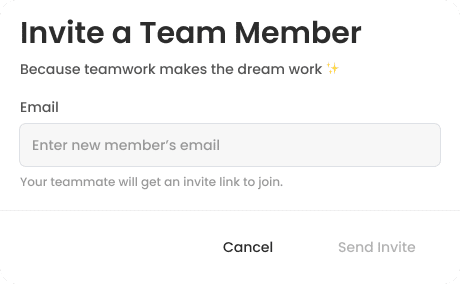
Invite links and automatic email verification make team onboarding seamless. No domain verification required — just send the link to your colleague.

Corporate team plans in Phygital+

Teams Plan

Enterprise plan

How These Changes Affect You

Existing Team Subscriptions

All old team subscriptions are automatically migrated to the new interface. If you haven’t assigned a team owner, the user with the most generations will become the owner. Owners have access to participant management.

For New Teams

You can immediately sign up for the Teams plan. You will be prompted to choose the number of seats, team name, and billing cycle (monthly/yearly).

For Personal Subscribers

If you are invited to a team, your current subscription will move to “Frozen” status. You will start using team credits, while your personal subscription days will “pause” and resume if you leave the team.

Team Subscription Roles

Team Owner

Team Owner can manage the team: invite and remove participants, add or reduce seats, cancel the subscription, and purchase additional credit packs. The owner sees the total credit balance and usage per participant.

Team Member

Team Member can see which team they belong to and their own credit balance.

New Account Page

With total balance and breakdown of each member's balance

Best AI Tools All in One Place

GPT Image

AI image generation & editing

Sora 2

Cinematic video generation

Imagen 4

Ultra-sharp images

Gemini 2.5 / 3.0

Multimodal generation & editing

Veo 3.1

Fast video + motion consistency

Gen 4

Best for consistent characters & video frame generations

Aleph

Video editing & effects

FLUX / FLUX 2

Pro & Dev image generation

FLUX Kontext

Context-aware editing

ControlNet / Inpaint / Outpaint

Advanced image editing tools

Kling 2.6

v1, v1.5, v1.6, v2 video generation

Seedream 4.5

Image generation & editing

Seedance

Lite & Pro video animation

Omnihuman

Human video generation

Wan 2.2 / 2.5

Image & video generation

QWEN 2.5

Image & text generation

Hailuo 2 Pro

High-quality video animation

Vectorizer

Image to SVG conversion

MidJourney

Image generation & variations

Upscale / Outpaint / Pan

Advanced editing tools

Sound Creation

Text to sound effects

Voice Creation

Text to speech & dialogue

Ideogram 3

Text-accurate image generation

Flux.Krea

Text-to-image & image-to-image

Topaz Labs

Topaz Video

Video upscaling & enhancement

FAQs

Answers to the most frequently asked questions about team subscriptions in Phygital+

In the workspace, hover over your profile icon and select from the dropdown menu. Alternatively, click “Upgrade” under Teams on the pricing screen, or click “Create Team” in your Personal Account.

If you are invited to a team or you create your own team, your current subscription will move to “Frozen” status. You will start using team credits, while your personal subscription days will “pause” and resume if you leave the team.

The discount depends on the number of seats and the billing period

  • 2 seats: 0% (monthly) / 5% (yearly)
  • 5 seats: 5% (monthly) / 10% (yearly)
  • 10 seats: 10% (monthly) / 20% (yearly)

All subscription receipts are automatically sent to your email. To work with Phygital+ on a contract basis, please contact us to set up an Enterprise subscription for your team.

The team owner can invite a member in the “Team Management” section of their personal account by entering their email. The potential member will receive an invite via email with a link to register or join. Clicking the link automatically verifies the email for new users and connects existing users to the team.

The owner can also copy the invite link and send it directly.

With an active subscription, you must first cancel it via “Cancel plan” in your personal account. Once the current period expires, the “Delete Team” button will become available to the owner.

Removing a user (deleting a specific email in Team Management) does not delete the seat. it frees up the seat so you can invite a new team member.

To delete a seat, click “Remove seats” in Team Management. The seat will be removed from the next billing period.

The seat remains active until the end of the current paid period. After that, the number of available “Seats” will decrease, the user in that seat will be removed from the team, and their previous personal subscription (if any) will reactivate.

When you subscribe to the Teams plan, you purchase a specific number of seats. Each seat is allocated a credit balance (90,000 credits per month for the Teams plan).
When you add a user, you assign that seat’s balance to them. Removing and adding users does not change the balance assigned to the seat itself.

No, only the owner can purchase additional credits for a specific user.

Credits are valid for 1 month and are refreshed one month after the subscription day (the day when the subscription was started or renewed).

This feature is currently in active development.

Yes, the Teams plan includes access to Midjourney.

The system will display an access error. We require email matching for security and automatic verification.

No, Legacy Teams and Video plans (which use a limit-based system instead of credits) are no longer available for new subscriptions.

Start for free

Create logos, mockups, and brand visuals in one place.

USA
PHYGITALISM Inc.
Address: 8 The Green, STE A street in the city of Dover, Country of Kent, 19901, Delaware
Email: we@phygitalism.com
Terms and Conditions

Western Europe
ИП ГОЛУБЕВА ЗОЯ ВЛАДИМИРОВНА
ОГРН 316774600314933 ИНН 773466856445
Email: we@phygitalism.com
Phone: +7 (993) 605-51-42
Terms and Conditions