Published date

Updated date

Read time

Category

Workflow Automation Explained: From Manual Tasks to AI Pipelines

A practical, vendor-neutral guide for marketing, design, and creative-ops teams: what workflow automation is, how it works, and how it evolved from manual tasks to AI-driven pipelines.

Alex Bobko

Marketing Director

Published date

Updated date

Read time

Category

Contents

Key takeaways

Bottom line: workflow automation is software that runs a sequence of tasks automatically — and its trajectory runs from simple rule-based steps that replace manual work to AI pipelines that interpret data, make decisions, and orchestrate entire business processes.

  • Workflow automation uses software to handle repetitive, rule-based tasks — assigning tasks, moving data, and triggering notifications — so a process runs the same way every time with minimal human intervention.

  • Every automated workflow is built on three things: triggers that start it, rules that decide what happens next, and the data that flows between steps.

  • Robotic process automation (RPA) mimics human actions to perform specific tasks, while workflow automation orchestrates entire business processes across systems using APIs — the two are complementary, not the same.

  • Independent research shows the payoff is real: current generative AI and other technologies could automate work activities that absorb 60–70% of employees’ time today (McKinsey, 2023).

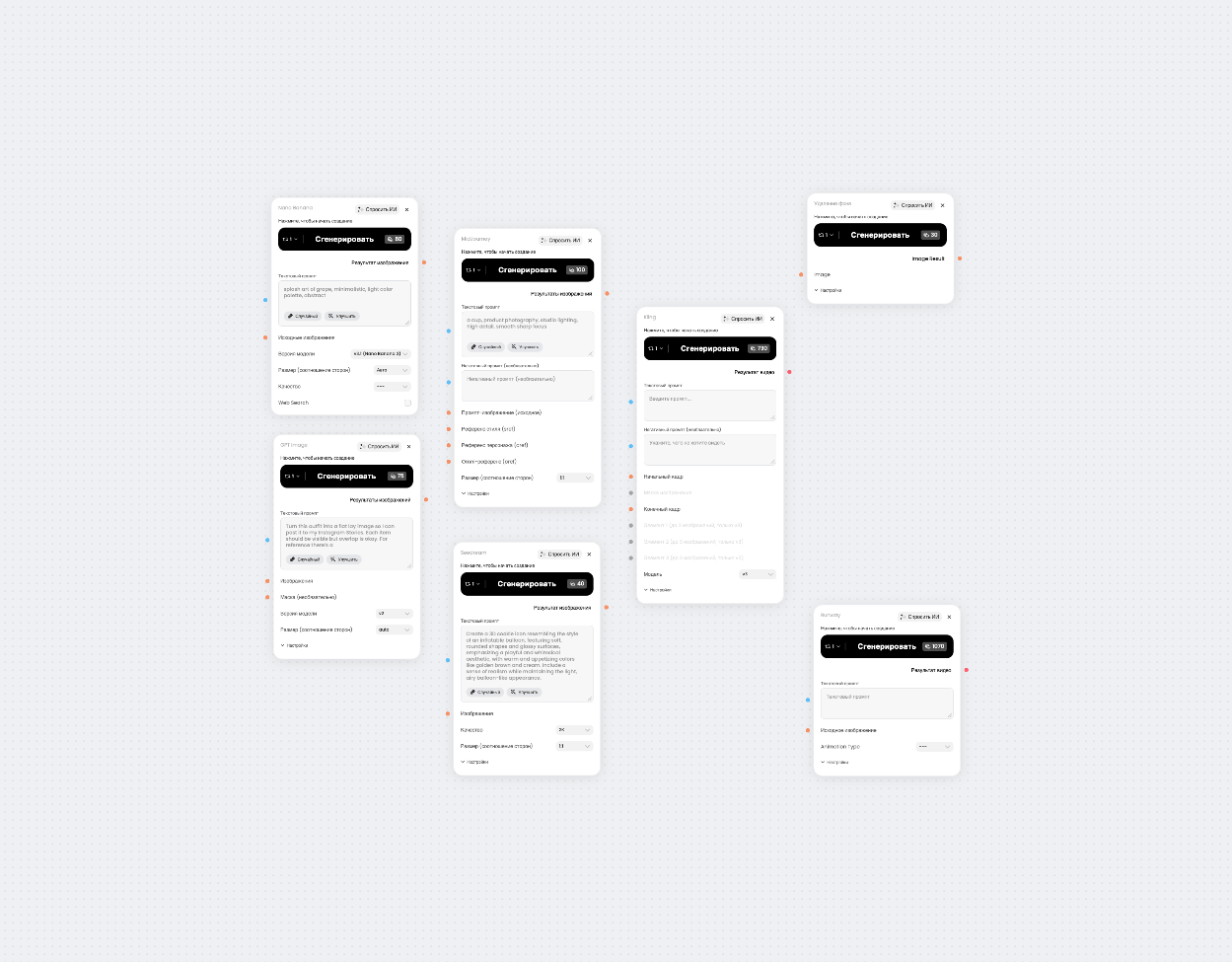
  • The frontier is AI pipelines: multi-model, multi-modal workflows that chain image, video, and text models into one repeatable creative process, instead of one-off generations.

Paragraph

In this guide

  • What is workflow automation?

  • From manual tasks to AI pipelines

  • The benefits of workflow automation

  • Examples of workflow automation

  • Workflow automation software and tools

  • How to implement workflow automation

  • By the numbers

  • Frequently asked questions

Workflow automation is the use of software to run a series of tasks automatically — moving work from one step to the next based on predefined triggers and rules, with little or no manual effort.

Every team has processes that quietly eat time: assigning tasks, chasing approvals, copying data between tools, sending the same updates over and over. Workflow automation takes that repetitive work off people’s plates so they can focus on the parts that need judgment.

This guide explains what workflow automation is, how it works, and how it has evolved — from manual tasks, through rule-based automation and RPA, to the AI pipelines reshaping creative production in 2026 — then covers the benefits, real examples, the tools to know, and how to implement your first automated workflow.

Paragraph

What is workflow automation?

Workflow automation is the use of software to automate a sequence of tasks — a workflow — so it runs with minimal human intervention. It connects multiple applications, moves data between them, and triggers actions automatically, replacing manual processes like data entry, task assignment, and follow-up with automated ones. The goal is straightforward: reduce manual tasks, cut human error, and make business processes faster and more consistent.

In practice, an automated workflow has a few defining properties:

  • It is trigger-based. A defined event — a form submission, a new file, a status change — starts the workflow automatically.

  • It follows rules. Rule-based logic decides what happens at each step and where work is routed.

  • It connects systems. APIs link the tools you already use, so data moves between existing systems without manual copying.

  • It is repeatable. The same process runs identically across hundreds of cases.

  • It reduces manual work. People step in only for exceptions and the decisions that genuinely need a human.

How workflow automation works

Workflow automation works through triggers, rules, and data. A trigger starts the process, rule-based logic evaluates conditions and decides the next step, and data flows from one application to the next through APIs. A new lead in a CRM (the trigger), for instance, can automatically assign a sales rep, send a welcome email, and create a follow-up task (the rules) — all without anyone touching it. Modern workflow automation platforms use visual builders to map these steps, so business users can design and run multiple workflows without writing code.

Workflow automation vs. RPA and business process automation

Workflow automation, robotic process automation, and business process automation overlap but are not identical. Workflow automation orchestrates a sequence of tasks across systems using APIs. Robotic process automation (RPA) mimics human actions — clicking, typing, copying — to perform specific, repetitive tasks, and it requires coding for each task change. Business process automation is the broadest term: automating entire, end-to-end business processes, often by combining workflow automation and RPA. All three can be part of a single business process management strategy.

Paragraph

From manual tasks to AI pipelines

Workflow automation has evolved through three stages: manual tasks done entirely by people, rule-based automation that replaced predictable steps, and AI pipelines that can interpret data and make decisions. Each stage removed more manual effort — and handled more complex processes — than the one before it.

Stage 1: Manual tasks

Manual tasks are the starting point: a person does each step by hand — manual data entry, assigning work, moving files, sending updates. Manual processes are flexible but slow, inconsistent, and prone to human error, and they do not scale, because more volume means more people. Most automation projects begin by mapping these time-consuming tasks to find what is worth automating.

Stage 2: Rule-based automation and RPA

Rule-based automation replaced predictable manual steps with software that follows explicit rules. Robotic process automation mimics human actions to perform specific tasks — filling forms, copying data between existing systems, processing invoices — quickly and without fatigue. This stage is excellent for high-volume, structured, repetitive tasks, but it is brittle: change the input format and a rules-based workflow breaks, because there is no rule for the new case.

Stage 3: AI workflows and pipelines

AI pipelines add a decision layer on top of automation. Instead of following fixed rules, an AI workflow can interpret unstructured data, make context-aware decisions, and improve through feedback loops — and chain several AI models so the output of one becomes the input of the next. This is where machine learning and predictive analytics enter the workflow, and where agentic AI can orchestrate multi-step processes toward a goal. For creative teams, the AI pipeline is multi-model and multi-modal: a single brief becomes finished assets across image, video, and text.

Dimension

Manual tasks

Rule-based / RPA

AI pipeline

How it works

Done by hand, step by step

Fixed, rules-based steps

Interprets data; makes context-aware decisions

Data it handles

Anything, but slowly

Structured, predictable inputs

Structured and unstructured (text, image, audio, video)

Decision-making

Human judgment at every step

None — follows the script

Probabilistic judgment within set guardrails

Adapts over time

Only if the person changes it

No — must be reprogrammed

Yes — improves via feedback loops

Speed and scale

Limited by headcount

Fast for identical tasks

Fast and scalable across variable tasks

Creative example

Resize and rename each export by hand

Auto-resize 500 exports to fixed specs

Generate, tag, and route on-brand variants from one brief

Paragraph

The benefits of workflow automation

Done well, workflow automation changes the economics of operational and creative work. The benefits of workflow automation cluster into a few areas.

Speed, consistency, and fewer errors

Automated workflows run at a faster, consistent pace without manual supervision, and because the same process runs every time, they reduce human error in data entry and processing. No skipped step, no mistyped figure, no missed handoff — the workflow behaves the same way on the thousandth run as on the first.

Cost savings and scalable output

By replacing manual labor with automated processes, workflow automation delivers significant cost savings and lets teams scale without increasing headcount. The same small team can handle far more volume, because the workflow — not another hire — absorbs the extra work. Automated processes can also operate around the clock, enhancing productivity beyond a normal workday.

Better collaboration and visibility

Workflow automation enhances collaboration by coordinating work across multiple departments and routing tasks to the right team members automatically, often through the collaboration tools a team already uses. Digital workflows also provide audit trails, real-time analytics, and process transparency, so teams can track progress, spot bottlenecks, and measure operational efficiency against key performance indicators.

Paragraph

Examples of workflow automation

Workflow automation shows up across modern business operations. A few common examples of workflow automation — weighted toward the creative and marketing work Phygital+ users care about.

Marketing and content production

Marketing automation creates design and copywriting tickets for email projects, generates ad-creative variants, and routes assets for approval — turning one campaign brief into many on-brand outputs automatically. Automated product feedback collection can even categorize user feedback by sentiment, so teams act on insight instead of sorting inboxes by hand.

Human resources and onboarding

In human resources, employee onboarding workflows automate account provisioning and payroll setup, so a new hire’s accounts, tools, and access are ready on day one. Other HR workflows handle leave requests, approvals, and follow-up tasks — assigning tasks to the right people without manual chasing or administrative oversight.

Creative and design operations

Design and creative-ops teams use workflows to keep large volumes of assets consistent: applying brand styles, generating format variations, and managing handoffs. Sprint planning can be automated to assign tasks based on team capacity, and automated project status reporting compiles updates into standardized reports — removing the busywork that surrounds the creative work itself.

Paragraph

Workflow automation software and tools

The market splits into a few categories. The right workflow automation software depends on whether your work is mostly operational, mostly creative, or a mix of both.

General-purpose automation platforms

Workflow automation tools like Zapier, Make, and n8n connect apps and trigger actions across systems, increasingly with AI steps built in. They excel at operational glue — moving data, syncing communication tools, and sending automated notifications across business systems — and at automating repetitive tasks between multiple applications.

RPA and business process tools

Robotic process automation tools handle deterministic, rule-based tasks — the high-volume, structured work like data entry and invoice processing. Business process management platforms sit above them, coordinating entire business processes across multiple departments and adding administrative oversight and regulatory compliance. Both are built for back-office automation rather than creative production.

Creative AI workflow platforms

For visual and content work, creative AI workflow platforms matter most. ComfyUI offers deep, node-based control but runs locally and has a steep learning curve. Phygital+ takes the same node-based, multi-model idea and runs it in the browser with 30+ AI models on one canvas — easier than ComfyUI, more structured than one-off generators, and built for teams (see Phygital+ vs. ComfyUI). Explore the AI image generator and AI Face Swap Tool to see the models in action.

Build your first AI workflow in Phygital+

Chain image, video, and text models on one visual canvas — no install, no juggling subscriptions. Turn a brief into ready-to-ship assets in minutes.

Open Phygital+

Paragraph

How to implement workflow automation

You do not need to be a developer to implement workflow automation on a modern platform. A reliable approach in five moves:

  • Start small and map your current workflow. Document the steps you take today, then start with one repetitive, time-consuming process — not your whole operation at once.

  • Find the highest-leverage tasks. Target the manual, rule-based work — the data entry, the task assignment, the variant generation — and leave judgment-heavy steps to people.

  • Choose your tools. Pick software with seamless integration into the systems your work already lives in. For creative work, a node-based, multi-model canvas keeps the pipeline visible and reusable.

  • Build, test, and add human review. Assemble the steps, run real inputs, and design points for human review for critical or brand-sensitive decisions. Automated systems can still make mistakes, so keep a person in the loop where it counts.

  • Involve stakeholders and monitor. Involve key stakeholders to improve adoption, then continuously monitor and optimize automated workflows — and create reusable templates for scalable automation.

Paragraph

By the numbers

Independent research — not vendor marketing — backs the case for workflow automation:

  • Current generative AI and other technologies could automate work activities that absorb 60–70% of employees’ time today, up from an earlier estimate of about half (McKinsey, 2023).

  • Organizations are projected to lower operational costs by 30% by combining hyperautomation technologies with redesigned operational processes (Gartner, 2021).

  • Hyperautomation remains a staple discipline for 90% of large enterprises, with demand rising sharply since generative AI went mainstream (Gartner, 2024).

  • Knowledge workers using GPT-4 produced over 40% higher-quality results, worked 25% faster, and completed 12% more tasks than peers without AI across 18 realistic business tasks (Harvard Business School / BCG, 2023).

  • Customer-support agents using a generative-AI assistant resolved 14% more issues per hour and cut average handle time by 9%, with the biggest gains for less-experienced staff (Brynjolfsson, Li & Raymond, NBER, 2023).

  • Generative AI could add the equivalent of $2.6–4.4 trillion to the global economy each year, with marketing and sales among the largest value pools (McKinsey, 2023).


Paragraph

Concept Explainer / Definition Box

Vendor-neutral guides, promt recipes, and workflow templates for teams using {Model Family Names} inside Phygital+, Updated weekly Vendor-neutral guides, promt recipes. Vendor-neutral guides, promt recipes, and workflow templates for teams using {Model Family Names} inside Phygital+, Updated weekly Vendor-neutral guides, promt recipes

Try Seedance 2.0
in Phygital+

Join 200+ teams using Phygital+ – every model in one workspace

Paragraph

Frequently asked questions

Workflow automation is using software to run a series of tasks automatically, so they happen without someone doing each step by hand. You define a trigger and a set of rules once, and the software moves work from step to step — assigning tasks, moving data, sending notifications — every time the trigger fires.

Workflow automation orchestrates a sequence of tasks across different systems using APIs. Robotic process automation (RPA) mimics human actions — clicking and typing — to automate specific tasks inside existing software, and it must be reconfigured for each change. Workflow automation connects processes end to end; RPA handles individual, repetitive steps. The two are often used together.

No. Most modern workflow automation software uses a visual, no-code builder, so business users connect apps and design workflows without writing code. Coding helps for advanced, custom integrations, but the majority of marketing, HR, and creative workflows can be built entirely in a visual builder.

Common examples include marketing automation that generates and routes campaign assets, employee onboarding that provisions accounts and payroll, sales workflows that assign leads and create follow-up tasks, and creative-ops pipelines that produce and tag on-brand variants. Almost any repetitive, rule-based process across HR, finance, and sales and marketing is a candidate.

Workflow automation usually automates a single sequence of tasks. Business process automation is broader: it automates entire, end-to-end business processes — often spanning several workflows, RPA bots, and departments. In practice, business process automation is the strategy, and workflow automation and RPA are the building blocks used to deliver it.

It depends on your work. General platforms like Zapier and n8n suit operational automation; ComfyUI suits power users comfortable with a local, node-based setup. For browser-based, multi-model creative production built for teams, Phygital+ runs 30+ AI models on one visual canvas — a more approachable, team-ready alternative to ComfyUI.

Paragraph

Related Articles 

What Is an AI Workflow? A 2026 Guide for Creative Teams

Home Learn Published date Updated date Read time Category Go back Vendor-neutral guides, promt recipes, and workflow templates for teams using {Model Family Names} inside Phygital+, Updated weekly Vendor-neutral guides, promt recipesFamily Names} inside Phygital+, Updated weekly Alex Bobko Marketing Director Published date Updated date Read time Category Contents  ...

To Articles

Workflow Automation Explained: From Manual Tasks to AI Pipelines

Home Learn Published date Updated date Read time Category Go back A practical, vendor-neutral guide for marketing, design, and creative-ops teams: what workflow automation is, how it works, and how it evolved from manual tasks to AI-driven pipelines. Alex Bobko Marketing Director Published date Updated date Read time Category Contents...

To Articles

Paragraph

Author Bio

Alex Bobko

Marketing Director

Marketing leader specializing in growth for AI-native products. At Phygital+, I own user acquisition, SEO, and conversion — and build AI-powered marketing workflows that help the team move faster and scale smarter. I write about practical ways to use gen AI in real marketing work: from prompt engineering to building automated creative pipelines.

Ship faster
with 30+ AI models in one workspace

Try Phygital+ free. Run today’s leading image, video, and text models from a single canvas — and build repeatable AI workflows without juggling subscriptions.