Published date

Updated date

Read time

Category

Node-Based AI Explained: The Visual Way to Build AI Pipelines

A practical, vendor-neutral guide for marketing, design, and creative-ops teams: what node-based AI is, how it works, and why visual pipelines beat one-off prompts.

Alex Bobko

Marketing Director

Published date

Updated date

Read time

Category

Contents

Key takeaways

Bottom line: node-based AI is a visual way to build AI pipelines — you connect each step as a node on a canvas, so a one-off prompt becomes a repeatable, editable creative process you can run again and again.

  • Node-based AI refers to a visual workflow approach in which each task — generate an image, mask a region, swap a model, export a variant — becomes a connected block, or node, on a single canvas.

  • Unlike a standard generative AI tool, which turns one prompt into one output, node-based AI gives granular control over every step and makes the whole sequence reusable, editable, and easy to debug.

  • The idea borrows from neural networks, which use nodes as artificial neurons to process data; node-based tools apply the same visual logic to creative pipelines.

  • For creative teams, this is already practical: browser-based node-based canvases like Phygital+ run 30+ AI models — image, video, 3D, voice, and text — on one canvas with no install, so you can chain the best model for each step and reuse the whole pipeline.

  • The shift is mainstream: in October 2025 Figma acquired the node-based AI canvas Weavy — now Figma Weave — for a reported $200 million, a signal that node-based creation is moving from power-user niche to default design workflow (TechCrunch, 2025).

  • For creative teams, the payoff is multi-model: one node-based canvas lets you chain a top image model, a top video model, and editing tools in one place, with consistent outputs across every run.

Paragraph

In this guide

  • What is node-based AI?

  • Node-based AI vs. standard generative AI

  • How node-based AI works

  • Why node-based AI fits creative production

  • Node-based AI tools to know

  • Challenges and limitations of node-based AI

  • Node-based AI in 2026 and beyond

  • By the numbers

  • Frequently asked questions

Node-based AI is a visual workflow approach for building AI systems: instead of typing one prompt and hoping for the best, you break the work into individual tasks and connect them as nodes on a canvas to create a pipeline, where each node’s output feeds the next.

Most creators already use AI one prompt at a time — a generated image here, an edit there. Node-based AI is the next step: it turns those isolated single prompts into a connected pipeline you can see, reuse, and refine, so the same flow that made one good asset can make a hundred — without repeating the same manual steps on every project.

Paragraph

What is node-based AI?

Node-based AI is a visual approach to building AI workflows in which each step is represented as a node — a single block that handles one specific task — and nodes are connected so the output of one becomes the input of the next. It breaks complex logic into connected blocks you can arrange on a canvas, rather than hiding it inside a single prompt or a script.

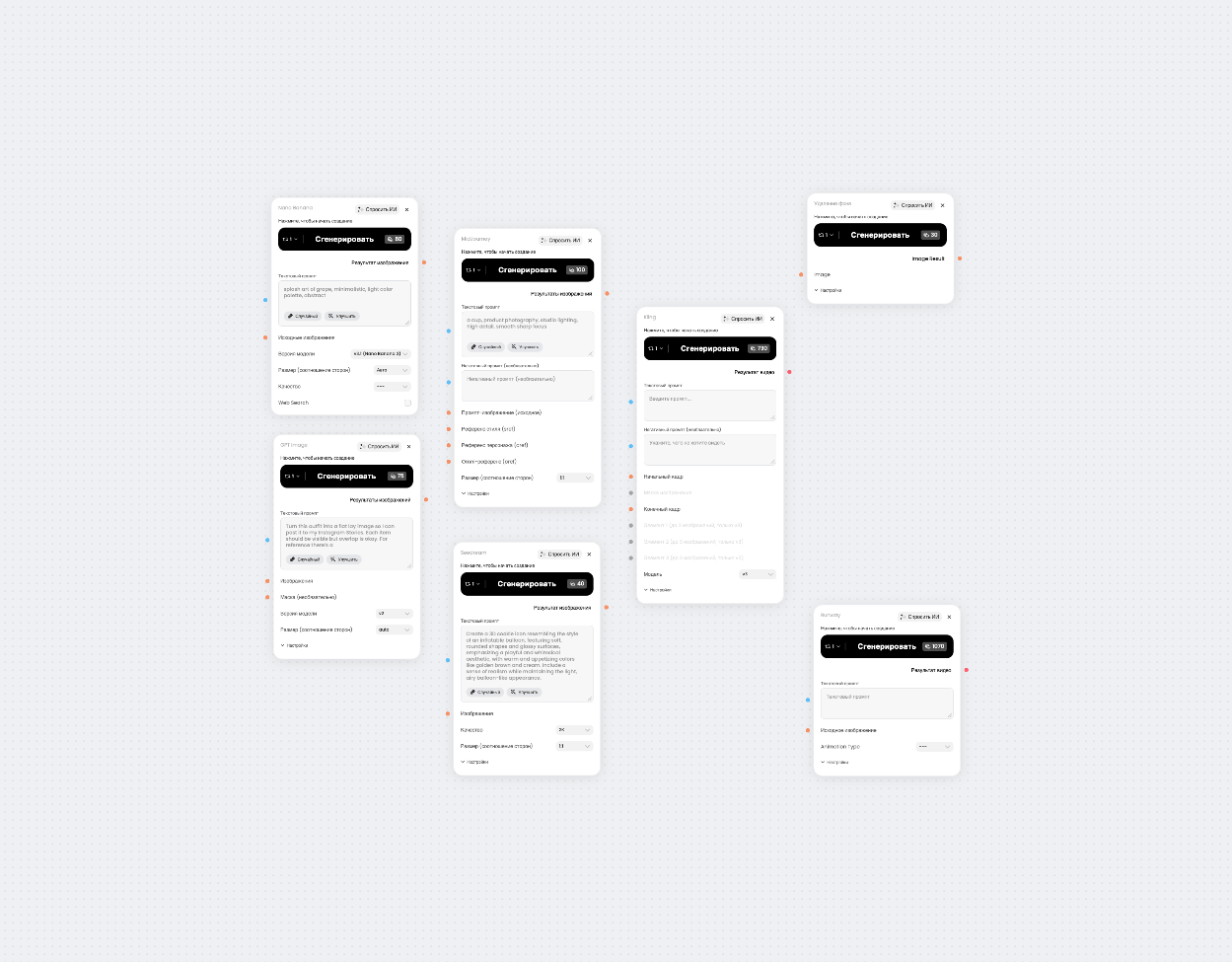
In a node-based tool, one node might generate an image, another mask an object, another call a different model, another export variants. Wiring those nodes together produces a visible map of how you got from idea to output — so you can change one node and rerun the whole sequence without starting over.

The defining traits of node-based AI systems

  • Each node does one job. A node handles a specific task — generate, edit, upscale, export — so the logic is broken into clear, connected blocks.

  • The workflow is visual. You build by connecting nodes on a canvas in plain English, not by writing code, which makes the whole process readable at a glance.

  • It offers white-box control. Node-based AI gives “white-box” visibility into every step, so troubleshooting and creative control happen in the open rather than inside a black box.

  • It is repeatable. Save a node-based workflow once and reuse it; duplicate it to save time on similar projects.

  • It is multi-model. The same canvas can run multiple models, so you are never locked into one provider.

Paragraph

Node-based AI vs. standard generative AI

Standard generative AI and node-based AI both produce content from AI models, but they work in fundamentally different ways. Standard generative AI uses one prompt for output with less control over the logic steps; node-based AI breaks that process into connected nodes you can see and adjust.

A standard generative AI tool takes a single prompt and returns a generated image, video, or block of text. It is fast and simple, and for one-off content it is often all you need — but the logic between input and output is hidden, so if the result is close but not right, your only lever is to rewrite the prompt and try again. Node-based AI adds a visible, editable pipeline instead: you connect a node for each stage, then tune any single node, reuse the whole flow, or automate variations by changing only the input nodes. That granular control is why node-based systems support iterative, controlled creative processes rather than one-shot guesses.

Dimension

Standard generative AI

Node-based AI

How it works

One prompt → one output

Connected nodes → a visible pipeline

Control

Limited to the prompt

Granular control over every step

Reuse

Re-prompt each time

Save and rerun the whole workflow

Models

Usually one model at a time

Multiple models on one canvas

Best for

Quick, one-off generations

Repeatable, multi-step creative pipelines

Debugging

Trial-and-error prompting

Visual debugging, node by node

Paragraph

How node-based AI works

A node-based workflow turns raw input into a finished result through a chain of connected nodes: you link each node’s output to the next node’s input, building a whole sequence from individual tasks. Because the connections are explicit, the workflow documents itself — anyone on the team can follow the flow from prompt to export. The exact nodes change with the task, but the underlying pattern holds across almost every creative use case.

Nodes: one step, one specific task

Each node in a workflow handles a specific task: one node handles generating content such as an image, another masks a region, another swaps in a different model, another exports variants. Keeping one node to one job is what makes a node-based canvas easy to read and easy to change — you always know which block to edit.

Running multiple models on one canvas

A defining advantage of node-based AI is running multiple models on the same canvas. One node might call a major model — say a GPT image model — for image generation, the next a video model, the next an editing tool — so you pick the best model for each step instead of forcing one model to do everything. Many node-based tools let you pay providers directly with your own keys, so you only pay provider prices instead of proprietary tokens.

Iterating with granular control

Node-based workflows allow easy iteration and control. Change one input node and the whole flow reruns to produce a variation; adjust a single parameter and only that step updates. Because every step is visible, debugging is visual too — it is easy to find logic errors node by node instead of re-prompting in the dark. The same property is what lets node-based systems support scalable content generation: feed new inputs through the same nodes and one workflow can produce high-quality content in large batches with minimal effort, automating repetitive creative tasks so the team spends its time on judgment instead of resizing and re-exporting.

Build your first node-based workflow in Phygital+

Chain image, video, and editing models on one visual canvas, in the browser — no install, no juggling subscriptions. Turn a brief into ready-to-ship assets in minutes.

Open Phygital+


Paragraph

Why node-based AI fits creative production

Most explanations of node-based AI come from engineering and game development, where the approach is popular for pipeline management. Creative teams have a different goal: producing a high volume of on-brand visual and written assets, fast, without losing consistency. Node-based AI fits that goal almost perfectly.

Repeatable creative pipelines

The point of a node-based canvas is repeatability. Define a creative pipeline once — brief in, prompts applied, models run, variants exported — and reuse it for every campaign, product, or client. Workflows can be duplicated to save time on similar projects, which is how small teams scale output without scaling headcount.

Vendor neutrality and pay-as-you-go models

Because a node-based canvas can call any major provider, it gives creative professionals vendor neutrality: no single model has to be best at everything. Different models sit at different price points, and node-based tools that let you bring your own keys mean you pay providers directly at provider prices — useful when a model ships an upgrade and you want to swap it into an existing flow.

The node-based canvas as a team workspace

A node-based canvas doubles as a shared workspace. Node-based tools support real-time collaboration, so teams can work in the same canvas, leave feedback, and keep visual outputs consistent across a project. Real-time feedback improves the review process, and a visible workflow means smoother communication than passing files between five tabs.

Paragraph

Node-based AI tools to know

The node-based AI space has grown quickly, from open-source engines to designer-friendly canvases that put many models on one platform. A few node-based AI tools worth knowing:

  • Phygital+ — a browser-based node-based canvas that runs many models on one canvas with no install. It is easier than ComfyUI and more structured than one-off generators (see Phygital+ vs. ComfyUI), and built for teams.

  • ComfyUI — the open-source, power-user node editor. It offers deep, granular control and custom nodes, but it usually runs locally (you self-host) and has a steep learning curve.

  • Figma Weave (formerly Weavy) — a browser-based node-based canvas that combines multiple AI models with professional editing tools; Figma acquired it to bring node-based AI into design workflows.

  • Flora — an “intelligent canvas” that unifies dozens of image and video models as nodes on an infinite canvas, aimed at creative direction and team exploration.

  • Krea Nodes, NodeTool, and Freepik Spaces — creator-friendly node workflows; NodeTool lets you self-host and run models locally, while Freepik Spaces brings node-based generation to an open creative AI workspace.

Paragraph

Challenges and limitations of node-based AI

Node-based AI is powerful, but it has trade-offs worth knowing before you commit.

  • Graphs can get messy. Node graphs become difficult to maintain if they are not managed well; visual clutter can complicate navigation on a large canvas.

  • Version control is harder. Node-based AI workflows can struggle with version control and merge conflicts when several people edit the same flow.

  • Performance overhead. A visual node system can introduce performance overhead compared with hand-optimized code.

  • A learning curve. The most powerful node editors expose a lot of parameters, so there is a ramp before a first workflow feels effortless.

Paragraph

Node-based AI in 2026 and beyond

Two shifts define where node-based AI is heading. First, it is going mainstream: the industry is shifting from prompt-based to node-based workflows, and Figma’s acquisition of Weavy put a node-based canvas at the center of one of the most-used design platforms in the world. Second, node-based tools are getting more approachable — designer-first canvases now let you start simple and add advanced features like branching and automation only when you need them.

For creative teams, both trends point the same way. The edge in 2026 is not access to one great model — it is a repeatable, multi-model pipeline that turns ideas into finished, on-brand assets faster than the competition. Node-based AI is how that pipeline gets built, and seen.


Paragraph

By the numbers

he momentum behind node-based and multi-model AI is visible in both the market and the research:

  • Phygital+ brings 30+ AI models into a single node-based workspace — spanning image, video, 3D, voice, and text generation (Sora, Veo, Kling, Flux, Seedance 2.0, GPT Image, and Claude among them) — so teams pick the best model for each step instead of juggling separate subscriptions. (phygital.plus)

  • Flora, a node-based generative AI canvas, raised a $42 million Series A in January 2026 (about $52 million in total funding) and is used by designers at brands including Nike, Levi’s, Pentagram, and Lionsgate (TechCrunch, 2026).

  • By 2027, 40% of generative AI solutions will be multimodal — running across text, image, audio, and video — up from just 1% in 2023, which pushes more work toward multi-model, node-based canvases (Gartner, 2024).

  • Knowledge workers using generative AI produced over 40% higher-quality results and worked about 25% faster than peers without it — a measure of how much structured AI work compresses repetitive tasks (Harvard Business School / BCG, 2023).

  • Generative AI could add the equivalent of $2.6–4.4 trillion to the global economy each year, with marketing and creative operations among the largest value pools (McKinsey, 2023).

Paragraph

Concept Explainer / Definition Box

Vendor-neutral guides, promt recipes, and workflow templates for teams using {Model Family Names} inside Phygital+, Updated weekly Vendor-neutral guides, promt recipes. Vendor-neutral guides, promt recipes, and workflow templates for teams using {Model Family Names} inside Phygital+, Updated weekly Vendor-neutral guides, promt recipes

Try Seedance 2.0
in Phygital+

Join 200+ teams using Phygital+ – every model in one workspace

Paragraph

Frequently asked questions

Node-based AI is a way to build AI workflows visually: each step becomes a block called a node, and you connect the nodes on a canvas so one node’s output feeds the next. Instead of typing one prompt for one result, you build a reusable pipeline — generate, edit, swap models, export — that you can run again and again.

Standard generative AI turns a single prompt into a single output, with little control over the steps in between. Node-based AI breaks that process into connected nodes you can see and adjust, giving granular control over each step and making the whole workflow reusable. In short, one is a one-shot request; the other is an editable pipeline.

No. ComfyUI is one popular node-based AI tool — an open-source, power-user engine you usually self-host. Node-based AI is the broader approach of building visual, connected workflows, and many tools use it, from ComfyUI to Figma Weave to browser-based canvases like Phygital+. ComfyUI offers deep control but a steep learning curve; other tools trade some depth for approachability.

A node is a single step in a workflow that handles one specific task — generating an image, masking an object, calling a model, or exporting a file. You connect nodes on a canvas to build a pipeline, where the output of one node becomes the input of the next. Keeping one node to one job is what makes the workflow easy to read and edit.

It depends on your work. ComfyUI suits power users comfortable with a local, node-based setup; Figma Weave and Flora suit designers who want multiple models on a visual canvas; and browser-based platforms like Phygital+ run many models on one canvas with no install, built for teams. There is no single best tool — the right one matches your models, budget, and skill level.

No. Node-based AI is designed to be visual: you build by connecting nodes on a canvas in plain English, not by writing code. That is much of the appeal — it makes building AI pipelines accessible to non-coders. Coding can help for advanced custom nodes, but most creative workflows can be built entirely in a visual editor.

Yes. Figma Weave is the node-based AI canvas formerly known as Weavy, which Figma acquired in October 2025. It combines multiple AI models with professional editing tools on a single browser-based, node-based canvas, so outputs can be branched, remixed, and refined. The acquisition is a clear signal that node-based AI is moving into mainstream design workflows.

Paragraph

Related Articles 

Workflow Automation Explained: From Manual Tasks to AI Pipelines

Home Learn Published date Updated date Read time Category Go back A practical, vendor-neutral guide for marketing, design, and creative-ops teams: what workflow automation is, how it works, and how it evolved from manual tasks to AI-driven pipelines. Alex Bobko Marketing Director Published date Updated date Read time Category Contents...

To Articles

Paragraph

Author Bio

Alex Bobko

Marketing Director

Marketing leader specializing in growth for AI-native products. At Phygital+, I own user acquisition, SEO, and conversion — and build AI-powered marketing workflows that help the team move faster and scale smarter. I write about practical ways to use gen AI in real marketing work: from prompt engineering to building automated creative pipelines.

Ship faster
with 30+ AI models in one workspace

Try Phygital+ free. Build node-based workflows that chain today’s leading image, video, and editing models on a single canvas — without juggling subscriptions.
