Image upscaling Generative detail Magnific AI Commercial use
Magnific

Magnific Upscale
– Image enhancement
model in Phygital+

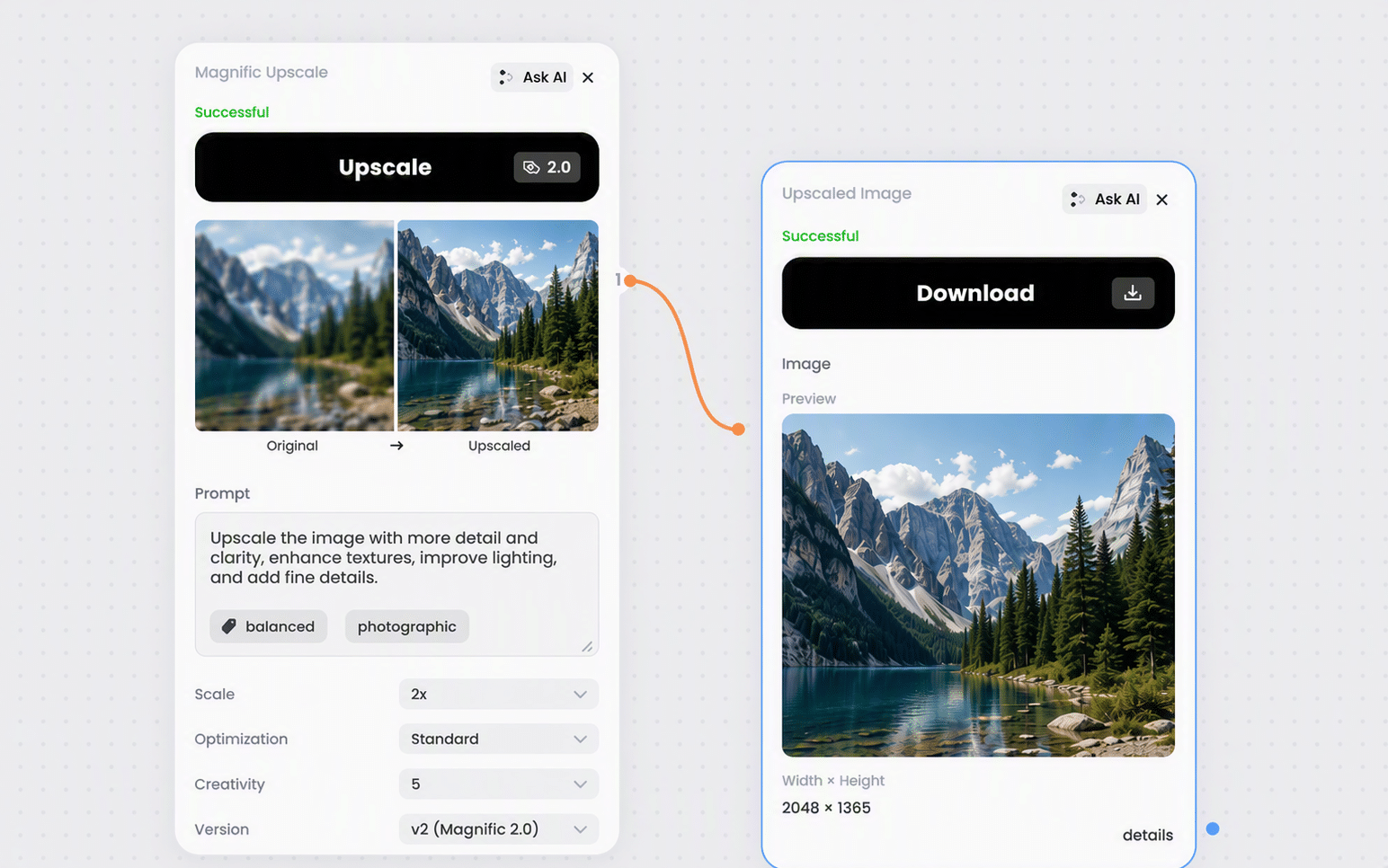
Magnific Upscale enlarges images up to 16x and generates the detail to fill the extra pixels. Nine enhancement modes cover portraits, illustration, 3D renders, landscapes, photography, and game assets, so the model knows what kind of texture belongs in the frame.

An optional prompt steers the added detail toward specific surfaces and materials, and controls for creativity, resemblance, fractality, HDR, grain, and ultra detail decide how far the enhancement goes.

Magnific

At a glance Magnific Upscale

Built for

AI images, 3D renders, illustrations, product visuals, and print-ready design assets

Design, 3D, and marketing teams that need more micro-detail than the source has

Vendor
Magnific AI
Category
Image enhancement — generative upscaling
Modalities
Image + optional prompt → image
Upscale factor
2x, 4x, 8x, 16x
Output ceiling
25.3 megapixels total
Enhancement modes
9, matched to content type
Engines
Automatic, Illusio, Sharpy, Sparkle
Access
All Phygital+ plans

Why use Magnific Upscale

Generative upscaling with per-content modes and precise control over how much is invented.

1

Adds detail, does not just enlarge

The model generates micro-detail rather than only recovering what is already there. AI images and renders that look flat at full size come back with the texture they should have had, which is exactly what a restoration upscaler cannot do.

2

A mode per content type

Portraits, illustration, 3D renders, landscapes, film and photography, game assets, each with its own mode. The kind of texture that belongs in a face is not the kind that belongs in a landscape, and the mode setting encodes that.

3

Prompt the texture

A short prompt steers the added detail toward specific surfaces: crisp silk, brushed metal, clean geometric edges. It guides the enhancement without changing the subject of the image.

4

You decide how far it goes

Creativity decides how much is invented, Resemblance pulls it back toward the original, Fractality controls intricacy per pixel. You set exactly how far from the source the result is allowed to travel.

5

Up to 16x for print

Up to 16x, within a 25.3 megapixel output ceiling. Enough headroom for print and large-format delivery, with conservative enhancement settings recommended at the higher multipliers.

Built for design, 3D, and marketing teams

Magnific fits at the end of a workflow, where a composition is right but the image needs more micro-detail than it was generated with.

Magnific
Magnific
Magnific
Magnific
Magnific
Magnific
Magnific
Magnific

How to use Magnific Upscale

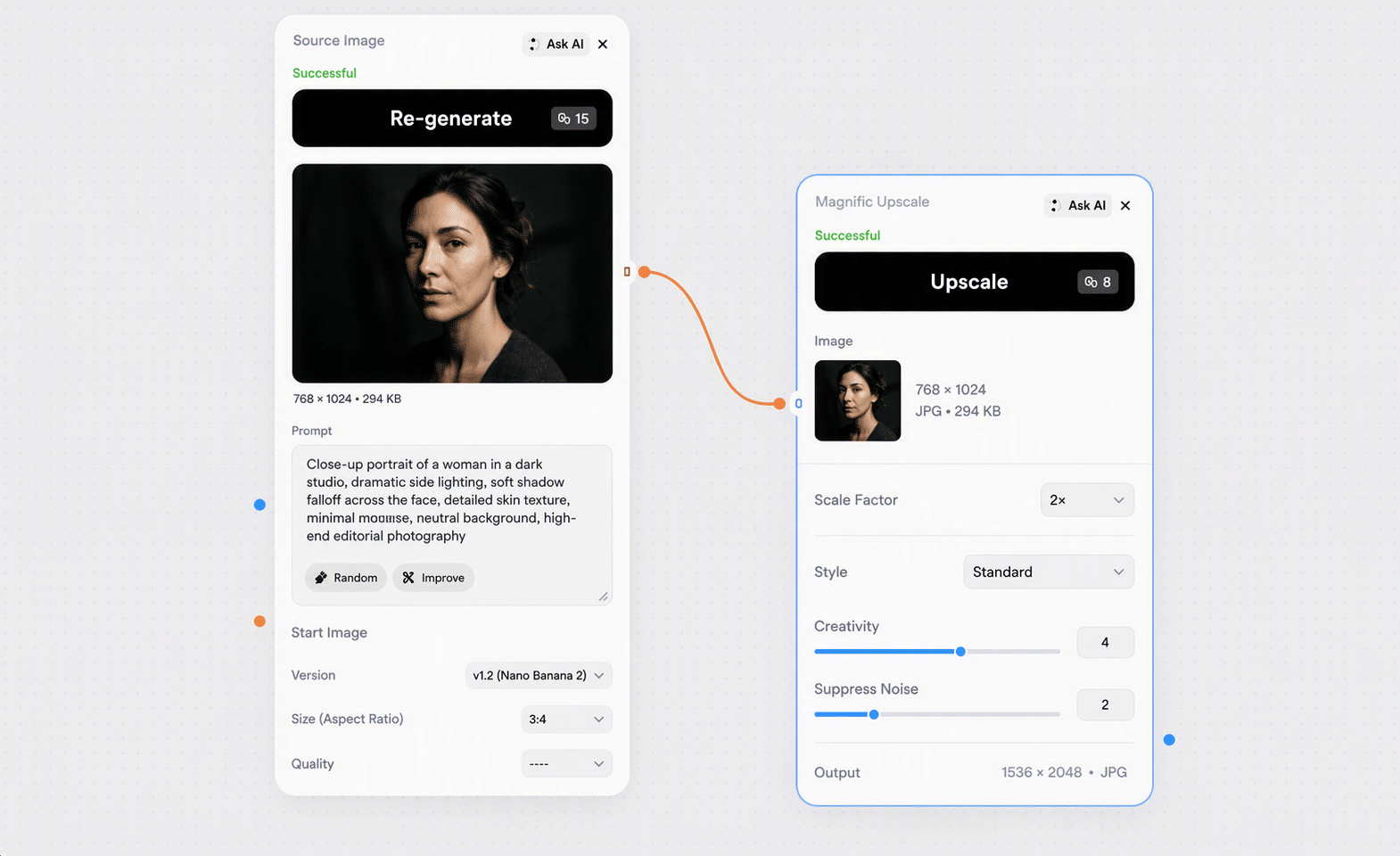
Connect an image, pick a scale and mode, and tune how far the enhancement goes.

Magnific
Step 1

Connect the image

Connect the source image. Optionally add a short prompt describing the surfaces you want emphasised, such as crisp fabric texture or clean geometric edges. Keep the prompt simple for portraits.

Magnific
Step 2

Pick scale and mode

Start at 2x with the Standard mode and default settings. Switch mode to match the content: portraits, art and illustration, 3D renders, nature, films and photography, or game assets. Leave the engine on Automatic unless you specifically want a crisper result.

Magnific
Step 3

Tune the enhancement

Raise Creativity for more invented detail, or Resemblance to pull it back toward the source. Adjust Sharpen, HDR, Fractality, Smart Grain, and Ultra Detail one at a time so you can tell what each change did. Keep enhancement conservative at high multipliers.

Generated with Magnific Upscale

Magnific
Magnific
Magnific
Magnific
Magnific
Magnific
Magnific
Magnific
Start Generating!

Pricing and access

One subscription across 30+ AI models, with no per-tool credit balances or separate signups. Credit cost per run is shown live in the node before you start it.

Free

Try Magnific Upscale free

500 weekly credits to test the node and see the output quality. No credit card required.

  • 500 weekly credits
  • Access to 30+ models
  • Personal use
Join as Free
Pro

Professional access

45,000 monthly credits with cheaper per-credit pricing, commercial rights, and full downloads.

  • 45,000 monthly credits
  • Commercial use license
  • 15% cheaper credits
Join as Pro
Team

Team collaboration

90,000 monthly credits, up to 10 seats, shared workspace, centralized billing, and priority support.

  • 90,000 monthly credits
  • Up to 10 seats
  • Centralized billing
Join as Team
Enterprise

Enterprise scale

210,000 monthly credits, API and integration support, unlimited seats, and dedicated management.

  • API & integration support
  • Unlimited seats
  • Dedicated manager
Join as Enterprise

Technical Specifications

Full specs for Magnific Upscale in Phygital+.

Vendor
Magnific AI
Input
Image, plus optional text prompt
Upscale factors
2x, 4x, 8x, 16x
Enhancement modes
Standard, portraits (soft and hard), art and illustration, videogame assets, nature, films and photography, 3D renders, sci-fi and horror
Versions
General, Precision v1, Precision v2
Detail controls
Creativity, Resemblance, Fractality, HDR, Sharpen
Category
Generative image upscaling
Output
Upscaled image
Output limit
Scale × input area must not exceed 25.3 MP
Engines
Automatic, Illusio, Sharpy, Sparkle
Upscale styles
Default, sublime, photo, photo denoiser
Finishing
Smart Grain (0–100), Ultra Detail (0–100)

Magnific Upscale vs Other AI models

How Magnific Upscale compares with the other enhancement nodes in Phygital+.

Model

Magnific Upscale

Generative upscaling that adds micro-detail and texture, with fine control over how far it goes

Topaz Upscale

Restoration-first upscaling with denoise, sharpen, and face recovery

Upscale Video

Video upscaling with enhancement models and frame interpolation

Vector Generator

Converts raster images to scalable vector output

Best for Enriching AI images, renders, and design assets Faithful enlargement of photos Enlarging and cleaning up video Making assets resolution-independent
Scale 2x, 4x, 8x, 16x 1x to 5x X1–X4 Not applicable
Invention Adjustable — from faithful to heavily reimagined Low by default Low Not applicable
Prompt Optional prompt to guide textures and materials None None None

Use Magnific Upscale Alongside other AI models In Phygital+

Put upscaling at the end of a generation chain instead of running it as a separate tool.

Magnific

Chain after image generation

Generate at the model's native size, then upscale only the frame you picked instead of every variant.

Magnific

Chain with background removal

Upscale first, then cut the subject out. A cleaner edge on a larger image gives a cleaner mask.

Magnific

Chain into video

Use the upscaled frame as the first frame for a video node so the clip opens on the sharpest version.

Magnific

Chain with the vectoriser

Send an upscaled still into the vectoriser when the asset needs to scale with no resolution ceiling.

Start Generating!

Everything you need to know about Magnific Upscale in Phygital+.

FAQ about Magnific Upscale

Magnific
What is Magnific Upscale?

Magnific Upscale enlarges images while generating additional detail, sharpness, and texture. Unlike a restoration upscaler, it can add micro-detail that was never in the source, which is why it suits AI images, 3D renders, and design assets that are compositionally finished but visually thin.

How much can it enlarge an image?

2x, 4x, 8x, and 16x. There is a hard ceiling on total output area: scale multiplied by the input width and height must stay at or below 25.3 megapixels, otherwise the run errors out. Start at 2x and move to 4x when you need a stronger final upscale.

Magnific or Topaz Upscale?

Magnific adds detail; Topaz recovers it. Use Magnific for AI images, renders, illustrations, and anything that should come out richer than it went in. Use Topaz for photographs, product shots, and archive material where accuracy matters more and invented texture would be a problem.

What are the Upscale Modes?

Nine, matched to content type: standard, standard portraits, hard portraits, art and illustration, videogame assets, nature and landscapes, films and photography, 3D renders, and science fiction and horror. Standard is the general-purpose default, and the portrait modes are worth using whenever faces are in the frame.

What does the optional prompt do?

It steers the added detail rather than changing the subject. Describe surfaces and materials: crisp silk texture, brushed metal with clean product edges, highly detailed eyes. Keep it simple on portraits so the enhancement stays natural, and focus on legibility rather than redesign for UI, logos, and text.

What do Creativity, Resemblance, and Fractality do?

Creativity decides how much new detail is invented versus how close the result stays to the original. Resemblance pulls it back toward the source. Fractality controls intricacy per square pixel, and HDR adjusts definition. Change one at a time, or you will not be able to tell which knob caused the change.

What are Smart Grain and Ultra Detail?

Smart Grain adds fine texture so an upscaled image does not read as too smooth and artificial. Ultra Detail controls how much fine structure the model introduces, from 0 to 100 with a default of 30. Both are finishing controls, and both are easy to overdo.

How much does Magnific Upscale cost in Phygital+?

Usage is credit-based and included in every plan, from Free up to Enterprise. The credit cost per run is shown in the node before you start it, so there is no separate Magnific subscription to buy.

Can I use the results commercially?

Outputs created on any paid plan come with commercial-use rights.

Explore more AI models In Phygital+

Browse the full catalog of 30+ AI models available in Phygital+.

Dialogue Creation ElevenLabs v3 FLUX Gemini Omni GPT-Image-2 Hailuo 3.0 Ideogram 3 Kling 3.0 Kling Omni Kling Omni Image Krea AI LTX Video Luma Magnific Upscale Midjourney Nano Banana Pro OmniHuman Qwen Image Recraft V4 Reve Runway 4.5 Seedance 2.5 Seedream 5 Sound Creation Topaz Upscale Upscale Video Veo 3.1 Voice Clone Voice Creation WAN 2.5 Wan Video 2.1

Ready to work Faster with Magnific Upscale?

Join 100+ teams using Phygital+ – every model in one workspace

Try Phygital+ free
bg