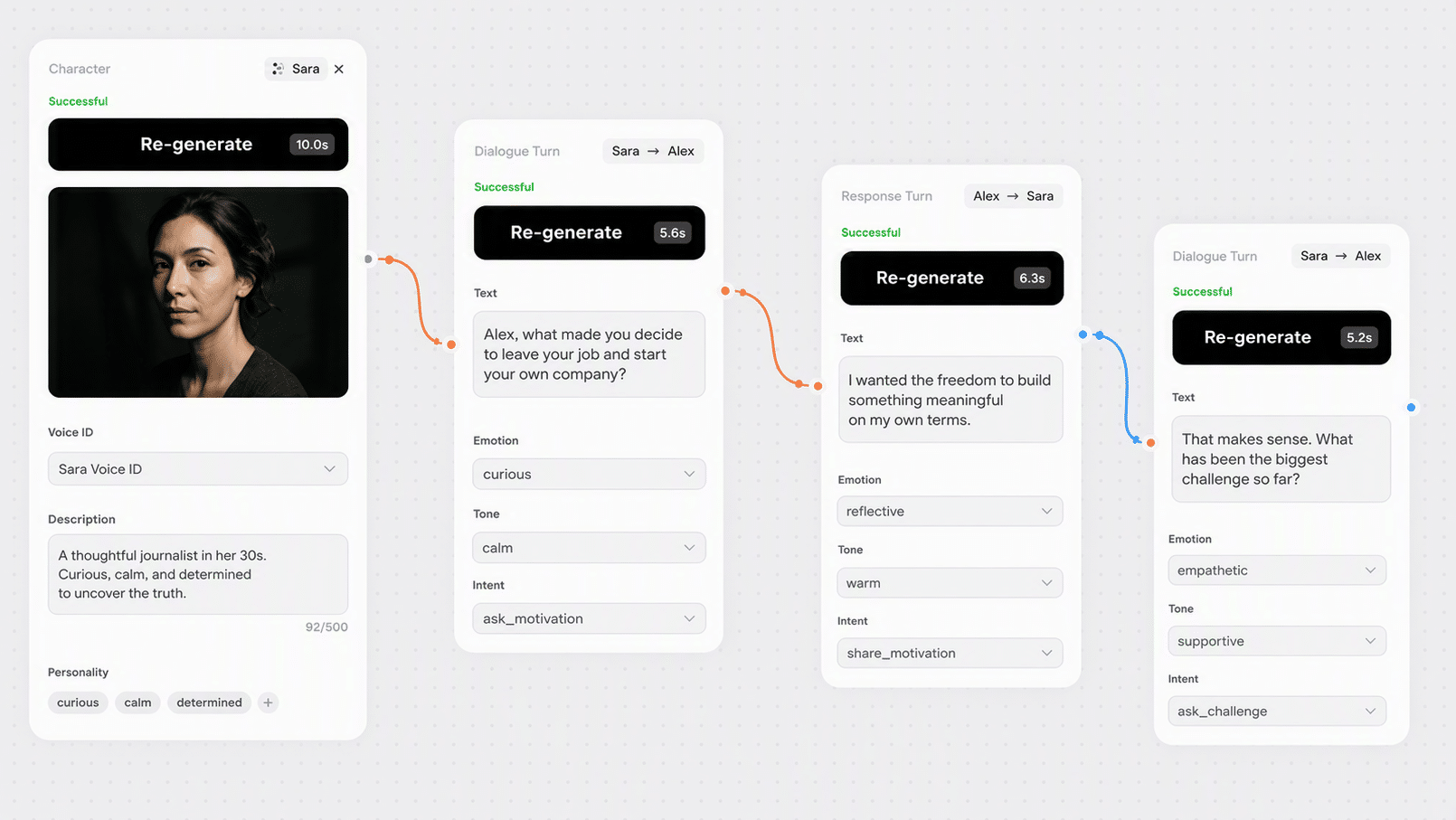
A conversation, not two monologues
The model generates both sides of the exchange together, matching prosody and pacing across the turn. Reactions land where they should instead of sounding like two people recorded in separate rooms.

 EN
EN
EN
EN
Dialogue Creation turns two scripts into one conversation. Each speaker gets their own text field and their own voice, and the model renders the exchange as a single scene with matched prosody rather than two monologues cut together.
It runs the Eleven v3 text-to-dialogue workflow, with ten voice presets per speaker and support for custom Voice IDs built elsewhere on the canvas. Recurring characters keep the same voice across every scene you generate.

Scripted ads, game scenes, UX prototypes, interview-style content, and role-play audio
Ad, game, and product teams that need a conversation rather than a monologue
Two speakers, two voices, one rendered scene with prosody matched across the exchange.
The model generates both sides of the exchange together, matching prosody and pacing across the turn. Reactions land where they should instead of sounding like two people recorded in separate rooms.

Each speaker gets their own preset or their own custom Voice ID, so the two characters stay clearly distinct. Ten presets cover most casting needs before you have to build anything.

Paste a Voice ID from Voice Creation or Voice Clone and the same character sounds the same in every scene you generate. That is what makes a series of clips feel like one production.

Split phrases with a semicolon and the dialogue alternates in the order they appear. Restructuring a scene is an edit to two text fields, not a re-record.

Fix the seed and the take is reproducible, so refining one line does not reshuffle the rest of the scene. Iterating on dialogue stops being a gamble.
Dialogue Creation fits wherever a script has two voices in it: ads, game scenes, UX prototypes, and interview-style content.


Split the script between two speakers, assign a voice to each, and generate.

Put the first speaker's lines in Text (1st person) and the second speaker's in Text (2nd person). Separate phrases with a semicolon, and keep the phrase count roughly balanced so the exchange alternates naturally.

Choose a preset for each speaker, or paste a custom Voice ID to override it. Voice IDs come from Voice Creation for invented characters or Voice Clone for real ones, and can be reused across every scene in a series.

Fix a seed so re-running one line does not change the rest of the scene. Chain the audio into a video node for an ad or animatic, or export it with commercial rights on your plan.
One subscription across 30+ AI models, with no per-tool credit balances or separate signups. Credit cost per generation is shown live in the node before you run it.
500 weekly credits to test the node and hear the output quality. No credit card required.
45,000 monthly credits with cheaper per-credit pricing, commercial rights, and full downloads.
90,000 monthly credits, up to 10 seats, shared workspace, centralized billing, and priority support.
210,000 monthly credits, API and integration support, unlimited seats, and dedicated management.
Full specs for Dialogue Creation in Phygital+.
How Dialogue Creation fits alongside the other audio nodes in Phygital+.
Chain scripting, voice design, dialogue, and video into one repeatable workflow.

Draft the conversation in a text node, split it between the two speaker fields, and generate the scene in one pass.

Design distinct character voices from written briefs, then paste each Voice ID into its speaker slot.

Clone two real speakers from recordings and reuse those Voice IDs for every scene in the series.
Generate the visuals in a video node and lay the dialogue track underneath for ads, demos, or animatics.
Everything you need to know about Dialogue Creation in Phygital+.
Dialogue Creation renders a two-speaker conversation as a single audio track using ElevenLabs voices. It runs the Eleven v3 text-to-dialogue workflow, which matches prosody across the exchange rather than generating each line in isolation and stitching them together.
Put the first speaker's lines in Text (1st person) and the second speaker's lines in Text (2nd person). Separate individual phrases with a semicolon. The dialogue alternates between speakers in the order the phrases appear, so keeping the phrase count balanced between the two fields produces a more natural back-and-forth.
Both. Ten voice presets are available per speaker, covering narration, news, character, educational, and conversational reads. If you paste a custom Voice ID into a speaker's custom voice field, it overrides the preset for that speaker.
Two ways. Voice Creation generates candidates from a written brief such as age, gender, timbre, pace, and accent, and returns several options to compare. Voice Clone builds a Voice ID from audio samples of a real speaker. Either way you end up with a Voice ID you can paste in and reuse.
Two. For scenes with more speakers, generate them in passes and assemble the result, or use a video model with native multi-character audio for scenes where the voices need to overlap.
Both speaker texts are required, so the node will not generate a one-sided scene. If you need a single voice, use Sound Creation instead.
Fix the seed. The same seed with the same scripts and voices reproduces the same take, which matters when you are iterating on one line and do not want the rest of the scene to change underneath you. The prompt limit is 5000 characters.
Usage is credit-based and included in every plan, from Free up to Enterprise. The credit cost per generation is shown in the node before you run it, so there is no separate ElevenLabs subscription to manage.
Outputs created on any paid plan come with commercial-use rights. Make sure you have permission for any voice cloned from a real person before publishing.
Browse the full catalog of 30+ AI models available in Phygital+.
Join 100+ teams using Phygital+ – every model in one workspace
Try Phygital+ free