A voice from a sentence
No recording, no casting, no rights to clear. A sentence describing age, timbre, pace, and accent is enough to get a usable speaker, which changes what is worth prototyping.

 EN
EN
EN
EN

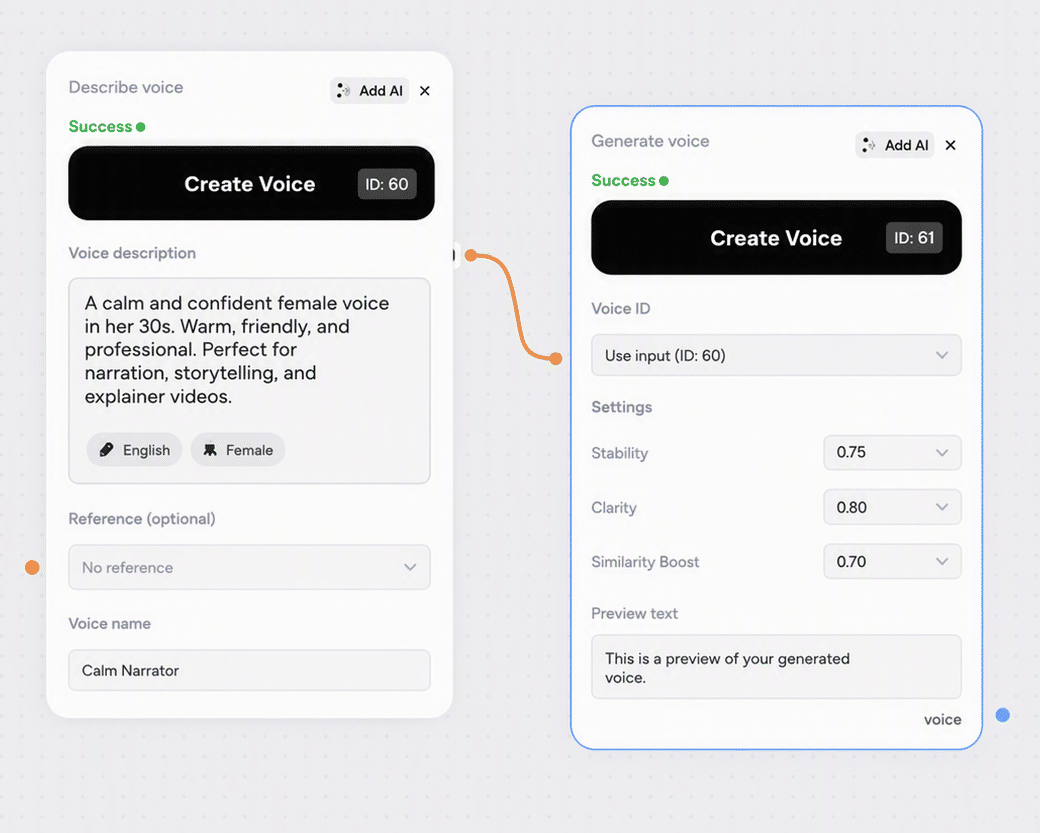
Voice Creation invents a speaker from a written brief. Describe age, gender, timbre, pace, emotion, accent, and style, and the node returns several audio candidates in one run so you can hear the options side by side before choosing.
The voice you pick becomes a reusable Voice ID that works in Sound Creation and Dialogue Creation, so a brand voice or a recurring character stays consistent across every clip on the canvas.

Character voices for games, brand voices for campaigns, narrators for explainers, and assistant voices
Brand, game, and localisation teams inventing a speaker instead of casting one
Describe a speaker, compare several candidates, and reuse the one you pick everywhere.
No recording, no casting, no rights to clear. A sentence describing age, timbre, pace, and accent is enough to get a usable speaker, which changes what is worth prototyping.

One run returns several candidates rather than a single take, so you audition options instead of accepting the first result. Each sounds meaningfully different, and listening to all of them before choosing is worth the minute it takes.

The Voice ID you pick works in Sound Creation and Dialogue Creation and can be reused indefinitely. A brand voice or a recurring character stays the same speaker across a whole campaign.

Same brief, different seed, different candidates. It is a cheap way to explore a range around one idea without rewriting the description every time.

Write the description in any language, and add your own script to hear the voice reading real copy rather than a generic sample. What you audition is what you will ship.
Voice Creation fits at the start of an audio workflow, where you need a speaker who does not exist yet and a casting call is not an option.


Describe the voice you want, generate candidates, and reuse the Voice ID downstream.

Write 20 to 1000 characters covering age, gender, timbre, pace, emotion, accent, and style. Around 50 to 200 characters gives the most focused result, and style tags such as whispery or news anchor sharpen it further. Any language works.

Add your own script in the optional text field to hear the voice on real copy, or enable Auto-generate text and let the model write appropriate lines. Set Loudness for intensity and a seed if you want the run reproducible.

Listen to every candidate before deciding, since each one sounds different. Extract the Voice ID from the one you want and paste it into Sound Creation or Dialogue Creation, where you can reuse it indefinitely.
One subscription across 30+ AI models, with no per-tool credit balances or separate signups. Credit cost per run is shown live in the node before you start it.
500 weekly credits to test the node and hear the output quality. No credit card required.
45,000 monthly credits with cheaper per-credit pricing, commercial rights, and full downloads.
90,000 monthly credits, up to 10 seats, shared workspace, centralized billing, and priority support.
210,000 monthly credits, API and integration support, unlimited seats, and dedicated management.
Full specs for Voice Creation in Phygital+.
How Voice Creation fits alongside the other audio nodes in Phygital+.
Design a voice once, then reuse it across every audio node on the canvas.
Paste the chosen Voice ID into Sound Creation and every narration clip from then on uses the same voice.

Design two contrasting voices, then assign one to each speaker in a two-person scene.

Write the voice brief with a text node when you are exploring a range of character options at once.

Generate the visuals in a video node and lay the finished voice track underneath.
Everything you need to know about Voice Creation in Phygital+.
Voice Creation generates new synthetic voices from a written description. You describe the speaker you want and the node returns several audio candidates in a single run, typically three, so you can compare them before committing to one voice identity.
Age, gender, timbre, pace, emotion, accent, and style, in a description between 20 and 1000 characters. Around 50 to 200 characters tends to give the most focused results. Style tags help: whispery, news anchor, cheerful, calm. You can write the brief in any language.
A professional male news anchor, 40 years old, clear and authoritative. A young female voice, 25 years old, cheerful and energetic, slight British accent. An elderly grandmother, 75 years old, warm and caring, speaks slowly. Short and specific beats long and hedged.
Yes. Add your own script in the optional text field, between 100 and 1000 characters, and the candidates will read it. If you leave it empty, enable Auto-generate text so the model writes contextually appropriate lines. The node tips recommend auto-generated text for the best results.
Extract the Voice ID from the sample you picked and paste it into the custom voice field of Sound Creation or Dialogue Creation. Voice IDs are reusable indefinitely, so a character or brand voice designed once stays consistent across every clip you generate afterwards.
Change the seed and re-run. The description stays the same but the candidates differ, which is the fastest way to explore a range around the same brief. Fix the seed when you want a run to be reproducible.
Loudness sets the intensity and volume of the generated voice, from -1 to 1. Around 0.4 to 0.7 works for most narration. Push it higher for energetic reads and lower for intimate or restrained delivery.
Usage is credit-based and included in every plan, from Free up to Enterprise. The credit cost per run is shown in the node before you start it, so there is no separate ElevenLabs subscription to manage.
Outputs created on any paid plan come with commercial-use rights. Since the voice is generated from a description rather than cloned from a person, there is no source recording to clear.
Browse the full catalog of 30+ AI models available in Phygital+.
Join 100+ teams using Phygital+ – every model in one workspace
Try Phygital+ free