Built around the still you have
The node is at its best when you hand it a frame rather than a description. A product photo or a portrait that already works becomes a clip without regenerating the composition from words and hoping it matches.

 EN
EN
EN
EN

LTX Video turns a still into a short animated clip. Connect an image, describe what should move, pick a camera motion preset, and you get anything from six to twenty seconds at up to 4K, in landscape or portrait.
Four model variants trade speed against quality, the newer 2.3 models accept an end frame for first-to-last-frame generation, and Pro models take an audio track as input for audio-driven video.

Animated product photos, cinematic portrait clips, landing page heroes, and social cuts
Product, social, and content teams turning existing stills into motion
Animate an existing still with camera presets, long durations, and 4K output.
The node is at its best when you hand it a frame rather than a description. A product photo or a portrait that already works becomes a clip without regenerating the composition from words and hoping it matches.

Dolly, jib, static, and focus shift as presets rather than prompt phrasing you have to keep rewording. Camera behaviour becomes a setting you can hold constant while everything else changes.

Six to twenty seconds, at 1080p, 1440p, or 4K, in landscape or portrait. Frame rate goes from 24 for cinematic motion to 50 for broadcast-style delivery, so the output matches the spec you were given.

On LTX-2.3 models you can connect an end frame and the clip resolves toward it. When the last shot matters as much as the first, you show both instead of describing the transition.

Pro variants accept an audio track as an input, so motion can follow a rhythm or a voice track rather than being cut to it afterwards.
LTX Video fits wherever a still already works and just needs to move: hero banners, product ads, and social cuts from existing photography.


Connect a still, describe the motion, pick a camera preset, and generate.

Connect a start image to anchor the animation on a frame you already approved, then write a compact prompt naming the subject, the motion, the mood, and the camera behaviour. Say explicitly what should stay still.

Use a fast variant for drafts and a pro variant for the final render. Only the 2.3 models accept an end frame. Set resolution to match where the clip will be published, and pick 24 fps for cinematic motion or 25 for broadcast-style work.

Choose a camera motion preset, or leave it on default. Static is the safe choice for portraits and product shots. Test at 6 seconds before committing to a longer render, then chain the result into an upscaler or an audio node.


One subscription across 30+ AI models, with no per-tool credit balances or separate signups. Credit cost per generation is shown live in the node before you run it.
500 weekly credits to test the model and see the output quality. No credit card required.
45,000 monthly credits with cheaper per-credit pricing, commercial rights, and video download.
90,000 monthly credits, up to 10 seats, shared workspace, centralized billing, and priority support.
210,000 monthly credits, API and integration support, unlimited seats, and dedicated management.
Full specs for LTX Video in Phygital+.
How LTX Video compares with the other AI video models in the Phygital+ catalog.
Chain image generation, animation, upscaling, and audio into one repeatable workflow.
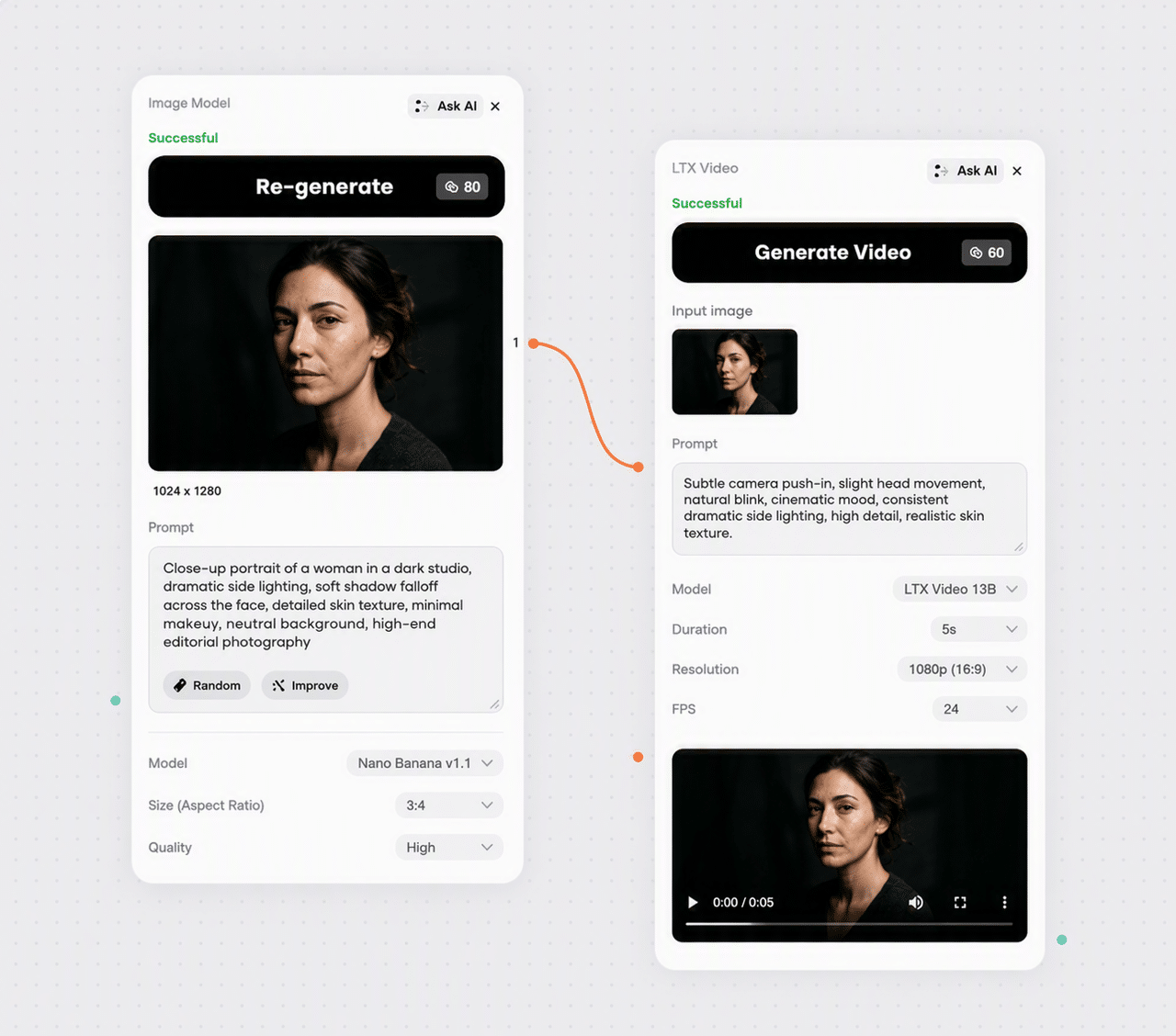
Generate the still first, approve the composition, then animate it in LTX Video instead of describing it twice.
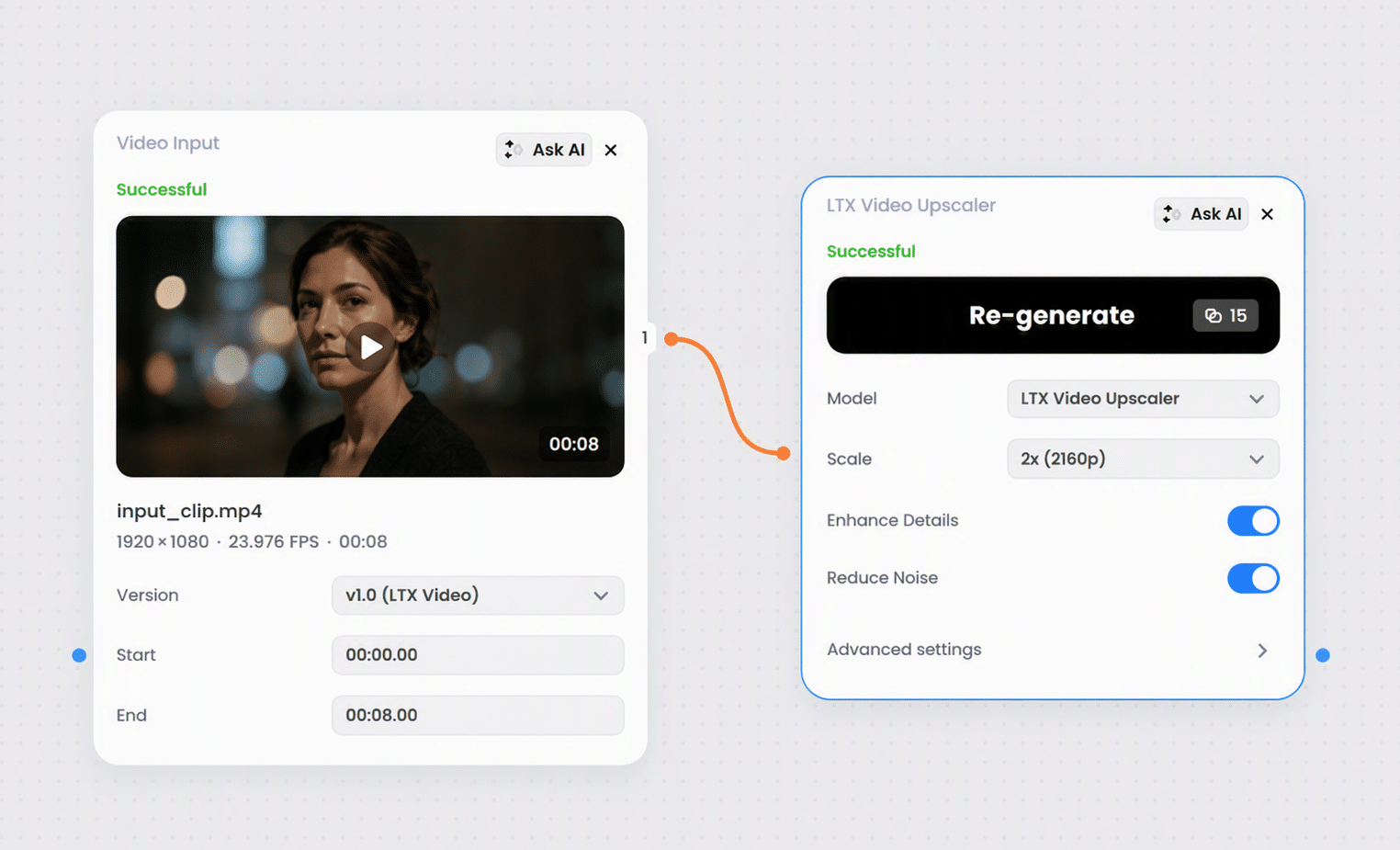
Take a 1080p clip into a video upscaler when you need delivery resolution without a 4K render.
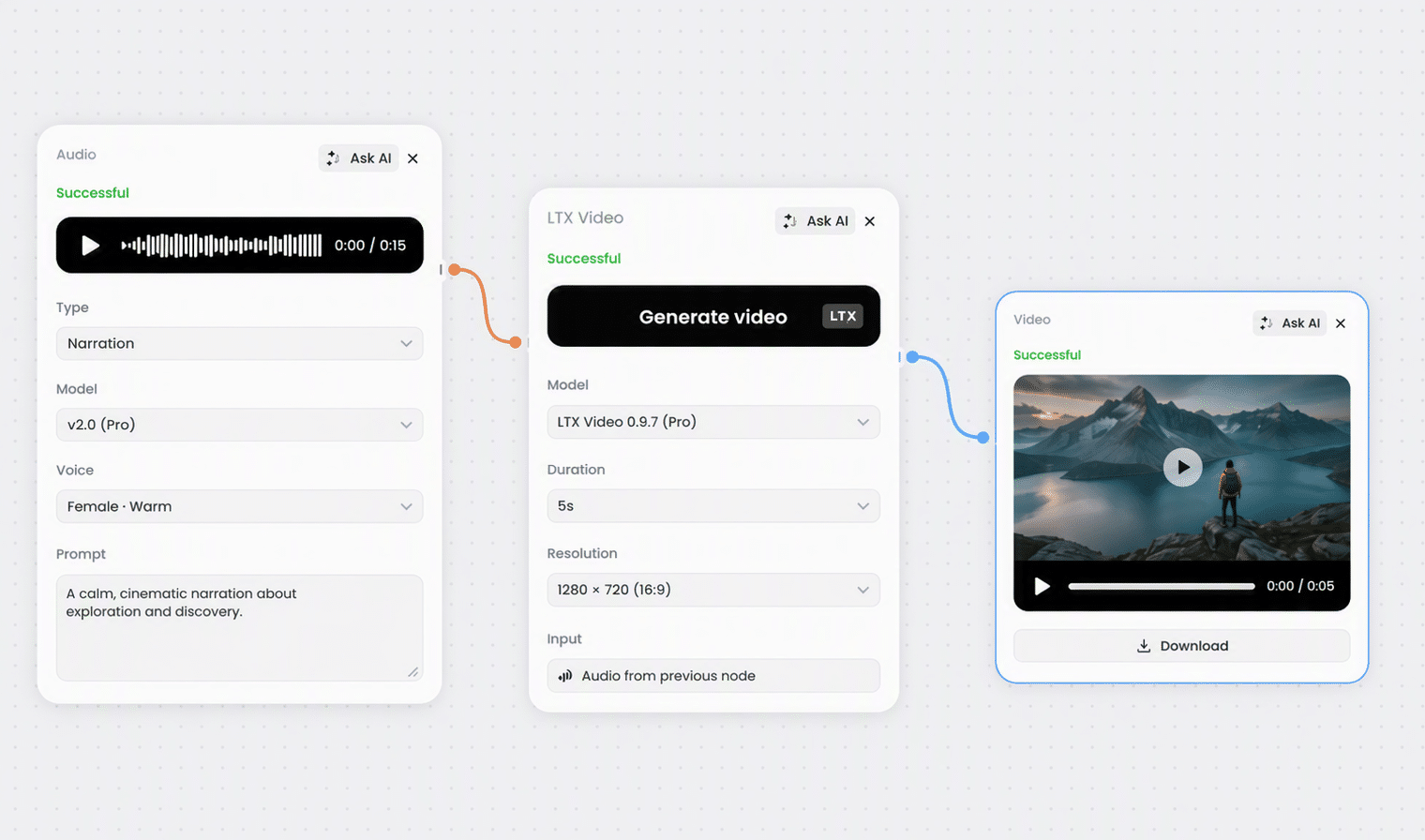
Generate narration or music in an audio node, then feed it into LTX Video as an audio input on Pro models.

Write the scene and motion description with a text node before sending it into the prompt.
Everything you need to know about LTX Video in Phygital+.
LTX Video generates video from text or from an image, with optional audio input and controls for model variant, resolution, duration, frame rate, and camera motion. In practice it works best as an image-to-video tool: give it a still and a description of what should move, and it produces a short animated clip.
Four: LTX-2 fast, LTX-2 pro, LTX-2.3 fast, and LTX-2.3 pro. Fast variants are the safer choice for iteration; pro variants suit final renders. The 2.3 models are the newer generation and the only ones that support an end frame.
1920x1080 and 1080x1920, 2560x1440 and 1440x2560, and 3840x2160 and 2160x3840. Every option has a landscape and a portrait version, so a vertical social cut is a setting rather than a crop.
From 6 to 20 seconds, in two-second steps. Shorter clips generally reduce drift and keep motion coherent. Longer durations suit slow cinematic movement but raise the chance of artefacts or a scene wandering away from where it started.
Eight presets: dolly in, dolly out, dolly left, dolly right, jib up, jib down, static, and focus shift, plus a default. Use motion sparingly when the source image already has strong perspective or a busy foreground, and pick static or something subtle for portraits and product shots.
Connect an end frame on an LTX-2.3 model and the clip resolves toward it. Earlier variants do not support it. It is the right tool when the final composition matters as much as the opening one.
Yes, on Pro models, for audio-to-video generation. There is also a Generate Audio toggle for automatic audio alongside the video. If you already have a separate sound design pass, leave it off to avoid unwanted mixing.
Keep it concise and grounded in the image. Say which parts should move and which should stay stable, since that is what preserves identity and composition. Use strong visual anchors such as lighting, environment, clothing, or product details to reduce drift across frames.
Usage is credit-based and included in every plan, from Free up to Enterprise. The credit cost per generation is shown in the node before you run it.
Browse the full catalog of 30+ AI models available in Phygital+.
Join 100+ teams using Phygital+ – every model in one workspace
Try Phygital+ free